P2i Lab

New · Commodore 64Nouveau · Commodore 64

PETSCII Commander 64

A whole little system for your C64, on one cartridge: a two-column disk manager, a desktop of big tiles, a SID tune player, a text editor, a voice that reads texts aloud, a fast loader, and ECCGMS to call BBSes. Switch on: a second later, it is there.

Tout un petit système pour votre C64, dans une seule cartouche : un gestionnaire de disquettes à deux colonnes, un bureau à grandes tuiles, un lecteur de musique SID, un éditeur de texte, une voix qui lit les textes à voix haute, un chargement rapide, et ECCGMS pour appeler les BBS. Allumez : une seconde plus tard, il est là.

Version 1.09, November 3, 2026: a 512 KB cartridge for VICE, a MiSTer, an Ultimate or a Kung Fu Flash. Free and open source.

Version 1.09, du 3 novembre 2026 : une cartouche de 512 Ko pour VICE, un MiSTer, un Ultimate ou une Kung Fu Flash. Gratuite et libre.

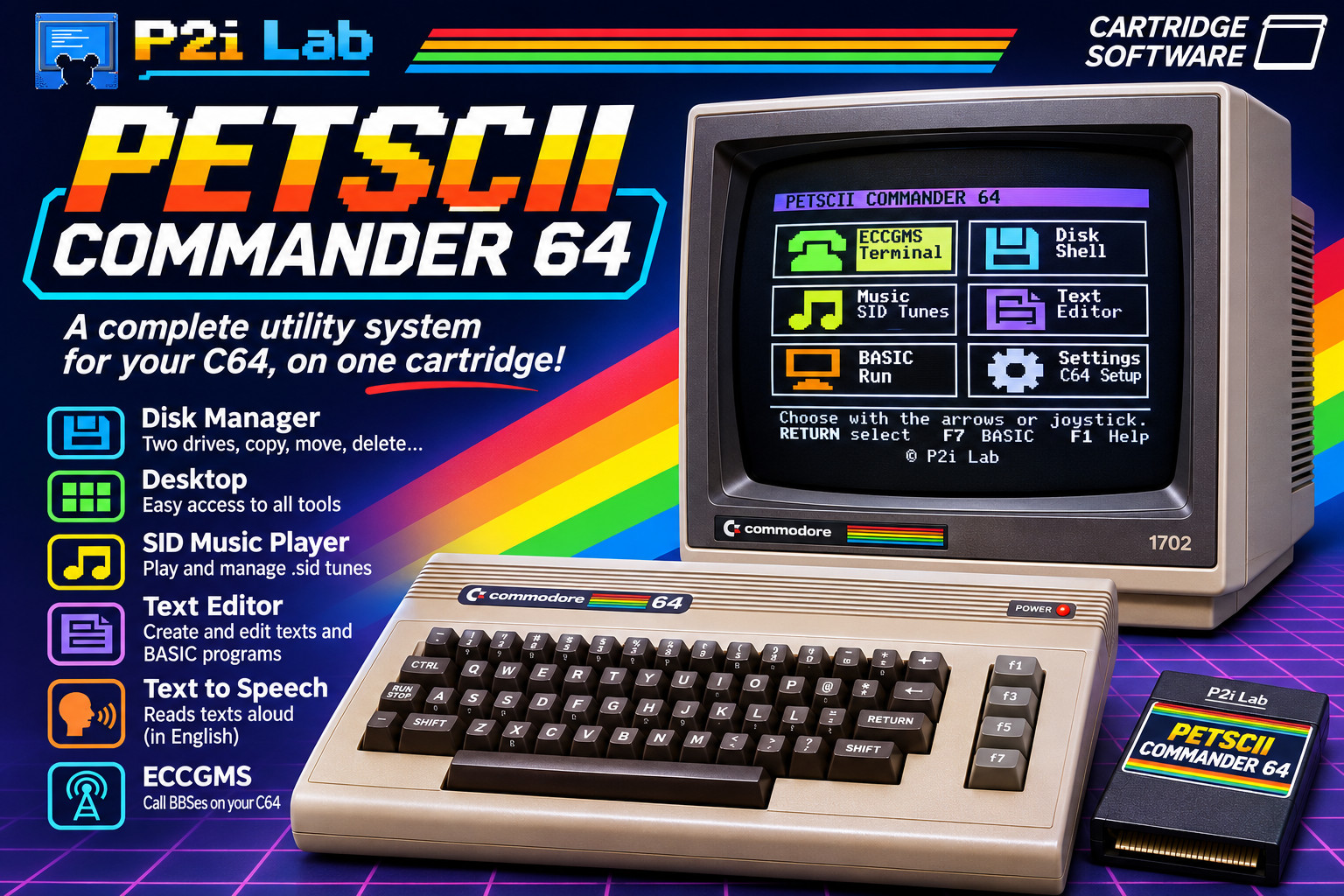
The PETSCII Commander 64 box: a Commodore 64, its cartridge and a monitor that shows the Desktop's six tiles. A complete utility system for your C64, on one cartridge: a disk manager (two drives, copy, move, delete), the Desktop, a SID music player, a text editor for texts and BASIC programs, text to speech (reads texts aloud, in English), and ECCGMS to call BBSes.

What it doesCe qu'il fait

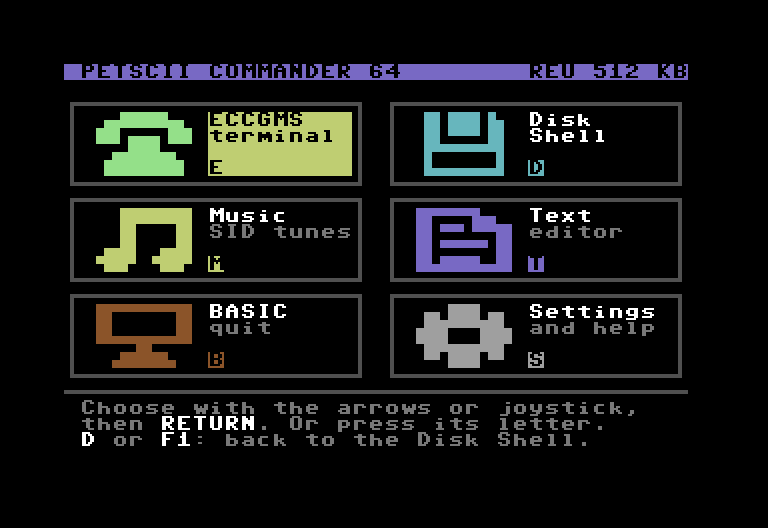
PETSCII Commander 64's Desktop on a Commodore 64: six big tiles (ECCGMS terminal, Disk Shell, Music, Text editor, BASIC, Settings and help), and at the top right the memory expansion it found, REU 512 KB.

Desktop

Six big tiles: ECCGMS, the Disk Shell, the SID tunes, the text editor, BASIC, the settings. The arrows (or the joystick) and RETURN, or a tile's letter. At the top right, the memory expansion it found.

Six grandes tuiles : ECCGMS, le Disk Shell, les morceaux SID, l'éditeur de texte, le BASIC, les réglages. Les flèches (ou le joystick) et RETURN, ou la lettre d'une tuile. En haut à droite, l'extension de mémoire trouvée.

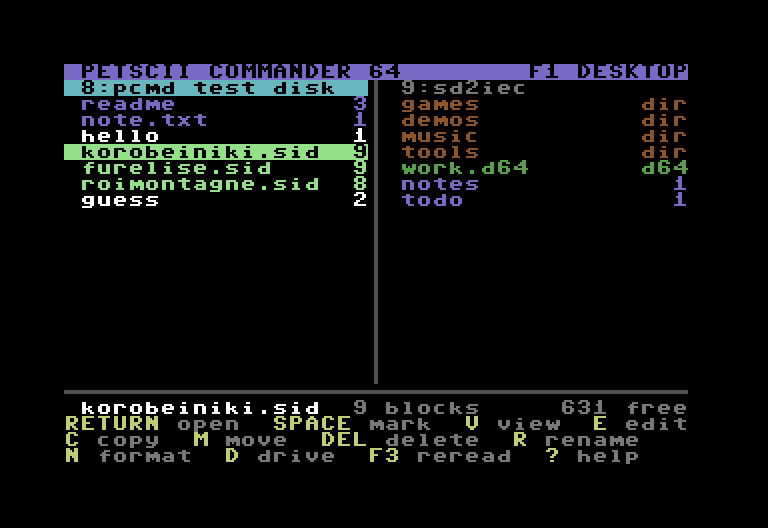
The Disk Shell: on the left, drive 8 and the test disk (a text, a PC text, a BASIC program, three SID tunes); on the right, drive 9, an SD2IEC with its folders and a .d64 image.

Disk Shell

Two drives side by side, as in Norton Commander: copy, move, delete, rename, format, a new folder (F7). Folders and .d64 images of an SD2IEC. RETURN runs a program, plays a SID tune, shows a text.

Deux lecteurs côte à côte, comme dans Norton Commander : copier, déplacer, effacer, renommer, formater, un nouveau dossier (F7). Les dossiers et les images .d64 d'une SD2IEC. RETURN lance un programme, joue un morceau SID, montre un texte.

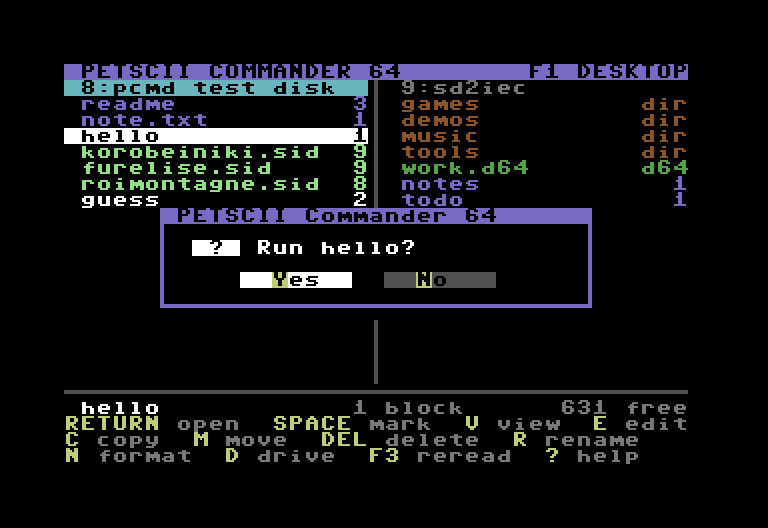
A question in a window in the middle of the screen, as on Windows: Run hello?, with the buttons Yes and No.

Questions in a windowLes questions dans une fenêtre

Run, delete, replace, format: the question comes in a window in the middle of the screen, as on Windows. Y or N, or the arrows (the joystick) and RETURN.

Lancer, effacer, remplacer, formater : la question arrive dans une fenêtre au milieu de l'écran, comme sous Windows. Y ou N, ou les flèches (le joystick) et RETURN.

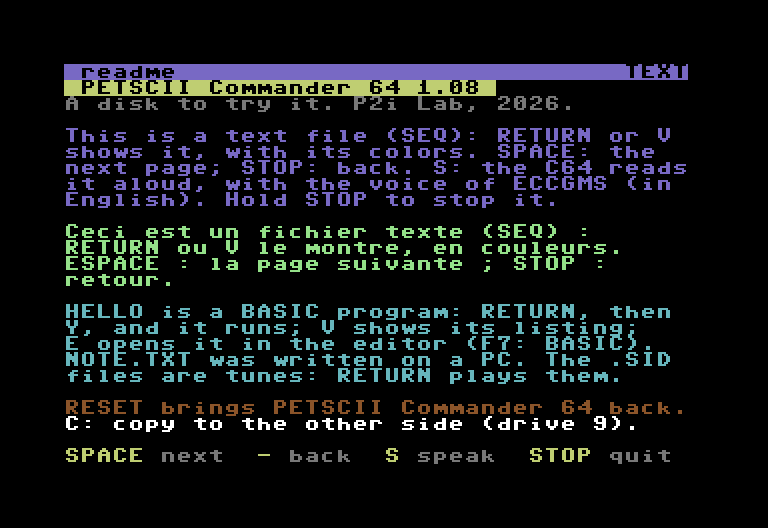
The viewer: the text of the test disk, in its PETSCII colors, with the keys at the bottom: SPACE next, - back, S speak, STOP quit.

Read a fileLire un fichier

V shows a C64 text in its colors, a text written on a PC, a BASIC program as LIST does, or anything else in hexadecimal. S reads a text aloud, with the voice of ECCGMS (in English).

V montre un texte de C64 dans ses couleurs, un texte écrit sur un PC, un programme BASIC comme LIST, ou n'importe quoi d'autre en hexadécimal. S lit un texte à voix haute, avec la voix d'ECCGMS (en anglais).

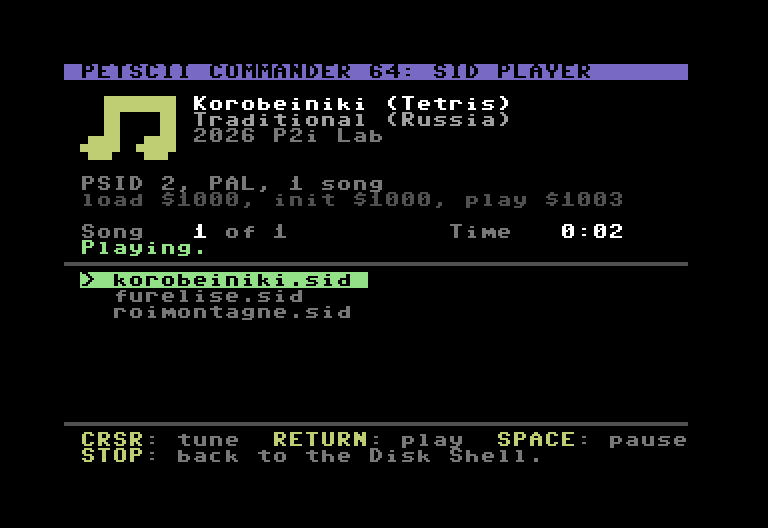
The SID player: Korobeiniki (Tetris), its author, its format and addresses, the time, and the list of the folder's tunes.

SID musicLa musique SID

RETURN on a .sid tune (those of the HVSC, of the BBS…): its title, its author, its time, and the folder's other tunes in a list. SPACE pauses it; a PAL tune plays at its own speed on an NTSC C64, and the other way round.

RETURN sur un morceau .sid (ceux de la HVSC, du BBS…) : son titre, son auteur, son temps, et les autres morceaux du dossier dans une liste. ESPACE le met en pause ; un morceau PAL joue à sa vitesse sur un C64 NTSC, et l'inverse.

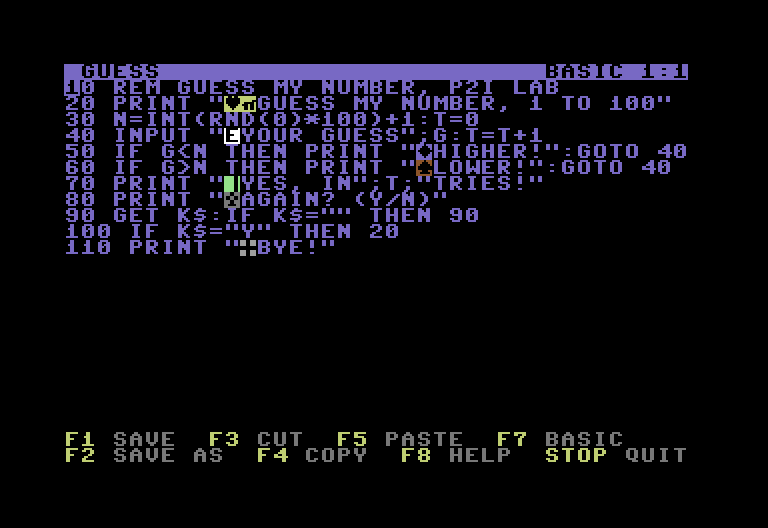
The text editor with a small BASIC game, Guess my number: its lines as LIST shows them, the color codes in reverse, and the keys F1 save, F3 cut, F5 paste, F7 BASIC.

Text editorL'éditeur de texte

E on a text or a BASIC program: type, cut, copy, paste, search. F7 sends the program to BASIC, turned into tokens exactly as the C64 does when you type a line: READY., then RUN.

E sur un texte ou un programme BASIC : écrire, couper, copier, coller, chercher. F7 envoie le programme au BASIC, transformé en mots-clés exactement comme le C64 le fait quand on tape une ligne : READY., puis RUN.

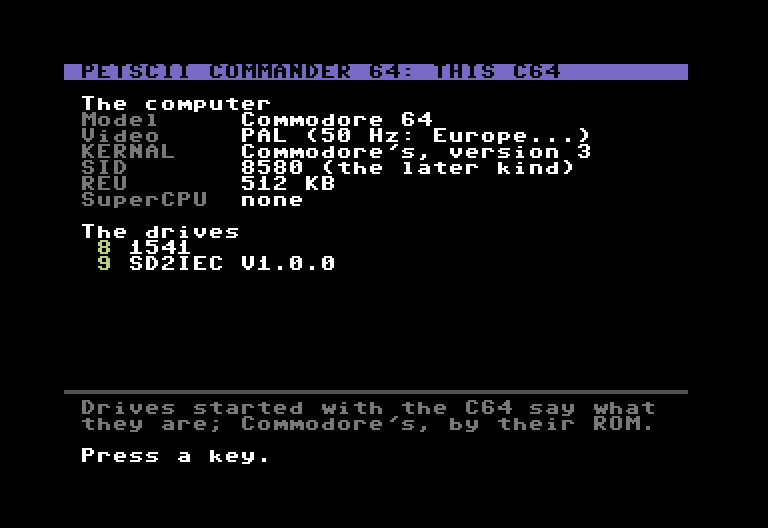
Settings, This C64: a Commodore 64, PAL, Commodore's KERNAL, a SID 8580, a REU of 512 KB, and its drives: 8, a 1541; 9, an SD2IEC.

SettingsLes réglages

This C64 shows what is plugged in: the model (C64, C128, SX-64), PAL or NTSC, the KERNAL (JiffyDOS), the SID, a REU, each drive. Also a US PC keyboard for the MiSTer, the colors, the first screen, the order of the files, fast load.

This C64 montre ce qui est branché : le modèle (C64, C128, SX-64), PAL ou NTSC, le KERNAL (JiffyDOS), le SID, une REU, chaque lecteur. Et aussi un clavier PC US pour le MiSTer, les couleurs, l'écran de départ, l'ordre des fichiers, le chargement rapide.

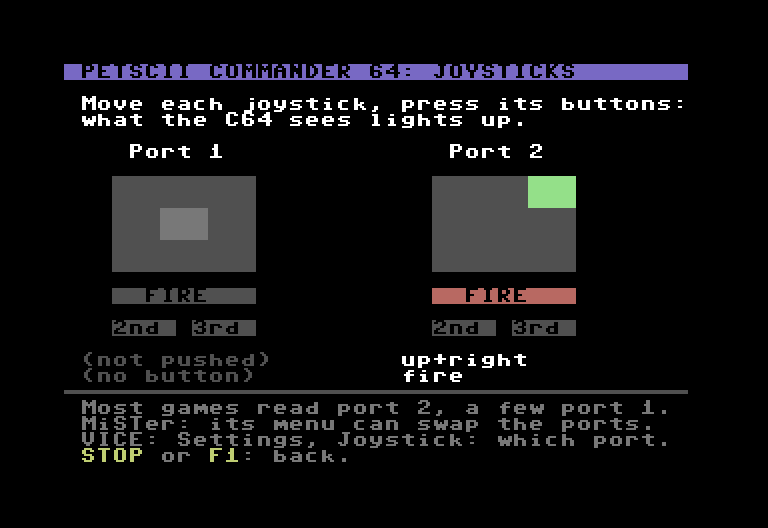
Settings, Joysticks: the two control ports side by side; port 2's stick pushed up and right, its square lit, and its FIRE button lit; under each port, buttons 2 and 3, and what it gives in words.

Joysticks

Move each joystick, press its buttons: what the C64 sees lights up, port 1 and port 2 side by side, buttons 2 and 3 too (the MiSTer's Fire 2 and Fire 3). So you see which port your joystick is in, and whether it works.

Bougez chaque manette, appuyez sur ses boutons : ce que voit le C64 s'allume, port 1 et port 2 côte à côte, les boutons 2 et 3 aussi (les Fire 2 et Fire 3 du MiSTer). De quoi savoir dans quel port est votre manette, et si elle marche.

  • 1 sfrom switching on to the Disk Shell.de l'allumage au Disk Shell.
  • 3 to 7×3 à 7 foisfaster to load a program from a 1541 (a turbo: 4 s instead of 14 for 5 KB), and from an SD2IEC (ELoad). With JiffyDOS, JiffyDOS itself.plus rapide pour charger un programme depuis un 1541 (un turbo : 4 s au lieu de 14 pour 5 Ko), et depuis une SD2IEC (ELoad). Avec JiffyDOS, JiffyDOS lui-même.
  • ECCGMSinside, with its voice and its big dictionary: the Desktop's first tile calls the BBSes, and Q in its menu comes back.dedans, avec sa voix et son grand dictionnaire : la première tuile du Desktop appelle les BBS, et Q dans son menu ramène ici.

Download PETSCII Commander 64Télécharger PETSCII Commander 64

New: version 1.09Nouveau : version 1.09

The cartridgeLa cartouche

petscii_commander_64.crt, with a disk to try it (pcmd_essai.d64: a text, a PC text, a BASIC program, three SID tunes), a short guide and the licenses. For VICE, a MiSTer, an Ultimate, or a real C64 with a Kung Fu Flash.

petscii_commander_64.crt, avec une disquette pour l'essayer (pcmd_essai.d64 : un texte, un texte de PC, un programme BASIC, trois morceaux SID), un petit guide et les licences. Pour VICE, un MiSTer, un Ultimate, ou un vrai C64 avec une Kung Fu Flash.

PETSCII-Commander-64-1.09.zip (156 KB)(156 Ko)

Source code (for programmers)Code source (pour programmeurs)

Not needed to use PETSCII Commander 64. C and 6502 assembly (cc65), Python tools, and its tests on a C64 imitated in Python. To build the cartridge: cc65 (from git: see README.txt), Python 3, and the source of ECCGMS next to it.

Inutile pour se servir de PETSCII Commander 64. C et assembleur 6502 (cc65), des outils en Python, et ses essais sur un C64 imité en Python. Pour fabriquer la cartouche : cc65 (celui de git : voir README.txt), Python 3, et la source d'ECCGMS à côté.

PETSCII-Commander-64-1.09-source.zip (324 KB)(324 Ko)

New in 1.09: keep both. Copying or moving a file onto one of the same name on the other side no longer just asks “Replace?”: it offers Replace, Keep both (chosen at first) or Cancel. Keep both copies the new one under a new name, with a number before its extension (super-mario.sid: super-mario2.sid, then 3…), the first one not on that disk: RETURN takes it, or change it first. The SID player no longer crashes when you leave a long tune that starts at $C000 for another one. And ECCGMS 1.33 inside: the MiSTer's modem found by itself.

Nouveau dans la 1.09 : garder les deux. Copier ou déplacer un fichier sur un autre du même nom, de l'autre côté, ne demande plus seulement « Replace? » : il propose Replace (remplacer), Keep both (garder les deux, choisi au départ) ou Cancel (annuler). Keep both copie le nouveau sous un autre nom, avec un numéro avant son extension (super-mario.sid : super-mario2.sid, puis 3…), le premier qui n'est pas sur cette disquette : RETURN le prend, ou changez-le d'abord. Le lecteur SID ne plante plus quand on quitte un long morceau qui commence en $C000 pour un autre. Et ECCGMS 1.33 dedans : le modem du MiSTer trouvé tout seul.

In 1.08: a new name, PETSCII Commander 64, so that everyone sees it is made for the Commodore 64. Its screens and ECCGMS in its cartridge say it, and the cartridge is now petscii_commander_64.crt. Nothing else changes.

Dans la 1.08 : un nouveau nom, PETSCII Commander 64, pour que tout le monde voie qu'il est fait pour le Commodore 64. Ses écrans et ECCGMS dans sa cartouche le disent, et la cartouche s'appelle maintenant petscii_commander_64.crt. Rien d'autre ne change.

Earlier versionsVersions précédentes

In 1.07: the fast loader works again with an SD2IEC after ECCGMS (and after the text editor or the SID player). PETSCII Commander 64 knows an SD2IEC by the message it gives when it starts; coming back from ECCGMS, it found the SD2IEC without it and loaded with the slow KERNAL. It now remembers its SD2IECs and asks them again. A 1541 was never affected (it is known by its ROM): its fast loader works after ECCGMS as before.

Dans la 1.07 : le chargement rapide marche de nouveau avec une SD2IEC après ECCGMS (et après l'éditeur de texte ou le lecteur SID). PETSCII Commander 64 reconnaît une SD2IEC au message qu'elle donne en démarrant ; revenu d'ECCGMS, il la trouvait sans ce message et chargeait avec le KERNAL, lent. Il se souvient maintenant de ses SD2IEC et le leur redemande. Un 1541 n'était pas touché (il est reconnu à sa ROM) : son chargement rapide marche après ECCGMS comme avant.

In 1.06: a check of the whole program for hidden freezes. Drive 9 with no disk (or a file that is not there) could still freeze “9: reading...”: PETSCII Commander 64 now reads the drive's status before it reads a file. A drive switched on while the Disk Shell watches for drives, or just before F3 or D, no longer freezes the C64 (it waits for the drive to be ready). With the files sorted by name, R, F5 and F7 work again (they broke the screen in 1.05). Back from a program or a SID tune, the start no longer freezes at its first disk read. And ECCGMS 1.32 inside.

Dans la 1.06 : une vérification de tout le programme, à la recherche des blocages cachés. Le lecteur 9 sans disquette (ou un fichier absent) pouvait encore bloquer « 9: reading... » : PETSCII Commander 64 lit maintenant l'état du lecteur avant de lire un fichier. Un lecteur allumé pendant que le Disk Shell regarde les lecteurs, ou juste avant F3 ou D, ne bloque plus le C64 (il attend que le lecteur soit prêt). Avec les fichiers triés par nom, R, F5 et F7 marchent de nouveau (ils cassaient l'écran dans la 1.05). Au retour d'un programme ou d'un morceau SID, le démarrage ne se bloque plus à sa première lecture de disquette. Et ECCGMS 1.32 dedans.

In 1.05: ECCGMS 1.31 inside: its voices no longer freeze the C64 (in VICE above all: while reading a text, or at the next disk read after the voice had spoken), and the voice that reads texts in PETSCII Commander 64 is fixed too. A drive with no disk in the right column (in VICE: drive 9 on, no disk image): the right column shows drive 8 instead, and F3 reads drive 9 again once it has a disk. And a column's message (“No disk in the drive.”) is on two lines, no longer cut.

Dans la 1.05 : ECCGMS 1.31 dedans : ses voix ne bloquent plus le C64 (dans VICE surtout : pendant la lecture d'un texte, ou à la lecture suivante d'une disquette après que la voix a parlé), et la voix qui lit les textes dans PETSCII Commander 64 est corrigée aussi. Un lecteur sans disquette dans la colonne de droite (dans VICE : le lecteur 9 allumé, sans image de disquette) : la colonne de droite montre alors le lecteur 8, et F3 relit le 9 une fois la disquette mise. Et le message d'une colonne (« No disk in the drive. ») tient sur deux lignes, il n'est plus coupé.

In 1.04: a drive switched on after the start (in VICE: drive 9 set in Settings, then a disk) shows up by itself in the right column, about a second later: no need to press D any more. F3 looks at once.

Dans la 1.04 : un lecteur mis en route après le démarrage (dans VICE : le lecteur 9 réglé dans Settings, puis une disquette) apparaît tout seul dans la colonne de droite, une seconde plus tard environ : plus besoin d'appuyer sur D. F3 regarde tout de suite.

In 1.03: Settings, J: Joysticks, a tester for both control ports. Live, for each port: where the stick is pushed, the fire button, and buttons 2 and 3 of the joysticks that have them (the MiSTer's Fire 2 and Fire 3). Most games read port 2: if your joystick lights up port 1, swap the ports (the MiSTer's menu, or VICE's Settings, Joystick).

Dans la 1.03 : Settings, J : Joysticks, un testeur des deux ports de manette. En direct, pour chaque port : où le manche est poussé, le bouton de tir, et les boutons 2 et 3 des manettes qui en ont (les Fire 2 et Fire 3 du MiSTer). La plupart des jeux lisent le port 2 : si votre manette allume le port 1, échangez les ports (le menu du MiSTer, ou Settings, Joystick dans VICE).

In 1.02: switched on with no disk in a 1541 and the disk put in later, the settings, the files, the copies and the editor work again (the 1541 kept answering “74, drive not ready”). And ECCGMS 1.3 inside, with its French voice: the cartridge is now 512 KB.

Dans la 1.02 : allumé sans disquette dans un 1541, la disquette mise ensuite, les réglages, les fichiers, les copies et l'éditeur marchent de nouveau (le 1541 répondait « 74, drive not ready »). Et ECCGMS 1.3 dedans, avec sa voix française : la cartouche passe à 512 Ko.

In 1.01: fixes, after a review of all the code. A name with * ? , : = is refused where it would reach other files (copy, move, rename, delete, format, new folder, the editor's save: s:letter? deleted letter1 and letter2). F5 then UJ (the drive starts again) no longer freezes the C64. A copy that meets a sector it can't read stops and says so; the editor too, instead of half a text. The editor's F7 (to BASIC) with a 16-letter name; the SID player with tunes that use the memory under BASIC's ROM; the fast loader leaves the loading to the KERNAL when it is not Commodore's own; in a folder, the settings are kept until the C64 is off. With ECCGMS 1.24 inside. A column shows 190 files at most (200 before).

Dans la 1.01 : des corrections, après une relecture de tout le code. Un nom avec * ? , : = est refusé là où il toucherait d'autres fichiers (copier, déplacer, renommer, effacer, formater, nouveau dossier, enregistrer dans l'éditeur : s:lettre? effaçait lettre1 et lettre2). F5 puis UJ (le lecteur redémarre) ne bloque plus le C64. Une copie qui rencontre un secteur illisible s'arrête et le dit ; l'éditeur aussi, au lieu d'un texte à moitié. F7 de l'éditeur (vers le BASIC) avec un nom de 16 lettres ; le lecteur SID et les morceaux qui utilisent la mémoire sous la ROM du BASIC ; le chargement rapide laisse faire le KERNAL quand ce n'est pas celui de Commodore ; dans un dossier, les réglages sont gardés jusqu'à l'extinction. Avec ECCGMS 1.24 dedans. Une colonne montre 190 fichiers au plus (200 avant).

Start itLe lancer

Unzip PETSCII-Commander-64-1.09.zip. Put a disk in drive 8 (the test disk, or your own: PETSCII Commander 64 keeps its settings on it), then the cartridge, last: about a second later, the Disk Shell.

Dézippez PETSCII-Commander-64-1.09.zip. Mettez une disquette dans le lecteur 8 (celle d'essai, ou la vôtre : PETSCII Commander 64 y garde ses réglages), puis la cartouche, en dernier : une seconde plus tard environ, le Disk Shell.

VICE

  • File menu, Attach disk image, drive 8: pcmd_essai.d64.
  • File menu, Attach cartridge image: petscii_commander_64.crt (or drag it onto VICE's window). VICE restarts the C64 with it.
  • For the fast load: True drive emulation on (VICE's usual setting).

MiSTer FPGA

  • Copy both files to the SD card, for example into games/C64.
  • In the C64 core's menu (F12), mount the disk in drive 8, then load petscii_commander_64.crt as a cartridge. To have it at every start: Hardware, Boot Cartridge: petscii_commander_64.crt.

Ultimate 64, C64 Ultimate, Ultimate II+

  • Copy both files to its USB stick or SD card.
  • In its menu, choose the disk, then Mount Disk (drive 8); then petscii_commander_64.crt, Run Cart.

A real C64 and a Kung Fu Flash

  • Copy petscii_commander_64.crt to the SD card of the Kung Fu Flash, then choose it in its menu.
  • The disk: a 1541, a 1571, an SD2IEC…

VICE

  • Menu File, Attach disk image, lecteur 8 : pcmd_essai.d64.
  • Menu File, Attach cartridge image : petscii_commander_64.crt (ou glissez-la sur la fenêtre de VICE). VICE redémarre le C64 avec elle.
  • Pour le chargement rapide : True drive emulation cochée (le réglage habituel de VICE).

MiSTer FPGA

  • Copiez les deux fichiers sur la carte SD, par exemple dans games/C64.
  • Dans le menu du cœur C64 (F12), montez la disquette en lecteur 8, puis chargez petscii_commander_64.crt comme cartouche. Pour l'avoir à chaque démarrage : Hardware, Boot Cartridge : petscii_commander_64.crt.

Ultimate 64, C64 Ultimate, Ultimate II+

  • Copiez les deux fichiers sur sa clé USB ou sa carte SD.
  • Dans son menu, choisissez la disquette, puis Mount Disk (lecteur 8) ; puis petscii_commander_64.crt, Run Cart.

Un vrai C64 et une Kung Fu Flash

  • Copiez petscii_commander_64.crt sur la carte SD de la Kung Fu Flash, puis choisissez-la dans son menu.
  • La disquette : un 1541, un 1571, une SD2IEC…

Good to knowBon à savoir

  • Back to PETSCII Commander 64: from a program, RESET; from BASIC, SYS 828; from ECCGMS, Q in its menu. Hold C= while you switch on: the C64 starts without the cartridge.
  • To call BBSes with the ECCGMS inside, the modem must not be at $DE00, the cartridge's address: as for the ECCGMS cartridge (VICE: the ACIA at $DF00; Ultimate: DF80; MiSTer: UP9600; a real C64: a WiFi modem on the user port).
  • Fast load: a turbo for Commodore's 1541 and 1571, ELoad for an SD2IEC; with JiffyDOS in the C64 and the drive, JiffyDOS itself; any other drive, the C64's usual loading. To turn it off: Settings (S on the Desktop), F.
  • Its screens are in English. The keys, on its help screen: ? in the Disk Shell.
  • Revenir à PETSCII Commander 64 : depuis un programme, RESET ; depuis le BASIC, SYS 828 ; depuis ECCGMS, Q dans son menu. Gardez C= enfoncée à l'allumage : le C64 démarre sans la cartouche.
  • Pour appeler les BBS avec l'ECCGMS qu'elle contient, le modem ne doit pas être en $DE00, l'adresse de la cartouche : comme pour la cartouche d'ECCGMS (VICE : l'ACIA en $DF00 ; Ultimate : DF80 ; MiSTer : UP9600 ; un vrai C64 : un modem WiFi sur le port utilisateur).
  • Le chargement rapide : un turbo pour les 1541 et 1571 de Commodore, ELoad pour une SD2IEC ; avec JiffyDOS dans le C64 et le lecteur, JiffyDOS lui-même ; tout autre lecteur, le chargement habituel du C64. Pour le couper : Settings (S sur le Desktop), F.
  • Ses écrans sont en anglais. Les touches, sur son écran d'aide : ? dans le Disk Shell.
NewNouveauECCGMS on a cartridge: ready 3 seconds after you switch onECCGMS en cartouche : prêt 3 secondes après l'allumage

Commodore 64

Call a BBS from your C64, the easy way.

Appeler un BBS depuis votre C64, simplement.

A BBS made for the C64s of today, and ECCGMS, a free program for your C64 that makes calling it easy: it finds your modem by itself, shows a list of BBSes at startup, has big menus, and can even read the BBS aloud, in English or in French.

Un BBS fait pour les C64 d'aujourd'hui, et ECCGMS, un programme gratuit pour votre C64 qui permet de l'appeler facilement : il trouve votre modem tout seul, affiche la liste des BBS dès le démarrage, propose un menu à grandes icônes, et peut même lire le BBS à voix haute, en anglais ou en français.

Latest official version: ECCGMS 1.33, November 3, 2026, on a disk and on a cartridge.

Dernière version officielle : ECCGMS 1.33, du 3 novembre 2026, sur disquette et en cartouche.

P2i Lab BBSBBS P2i Lab checking…vérification…
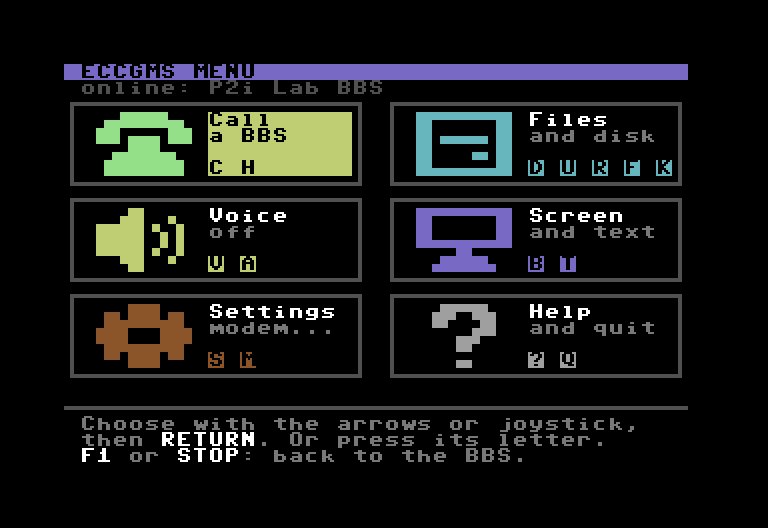
ECCGMS on a Commodore 64: its menu of six big tiles (Call, Files, Voice, Screen, Settings, Help), opened while connected to the P2i Lab BBS.

The P2i Lab BBSLe BBS P2i Lab

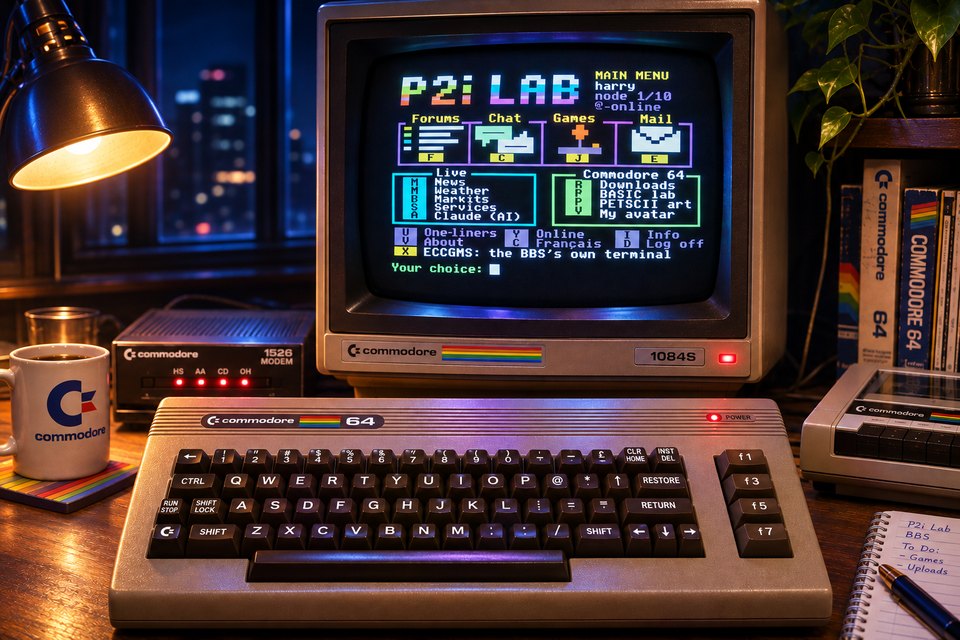
An illustration of the P2i Lab BBS: a Commodore 64 on a desk at night, its 1084S monitor showing the BBS main menu (forums, chat, games, mail, live news, weather, markets, Claude, downloads, BASIC lab, PETSCII art), with a modem, a mug and a datasette beside it.
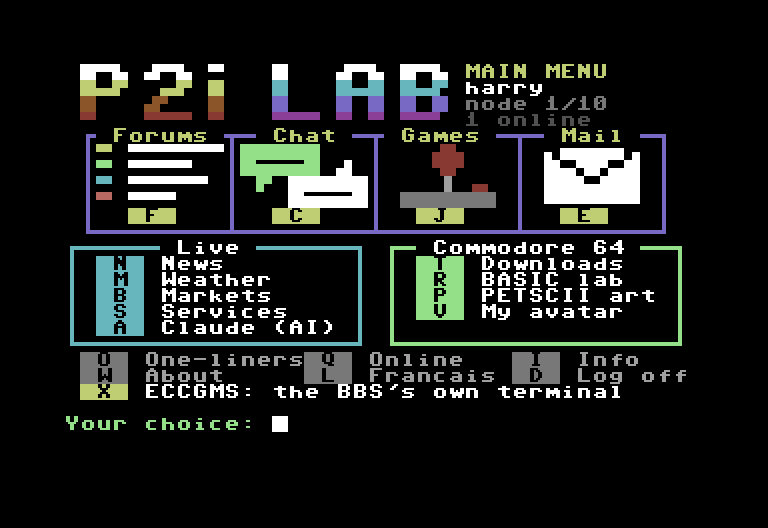
The main menu of the P2i Lab BBS on a C64 screen: forums, chat, games, mail, live news, weather, markets, Claude, SID music, programs to download, BASIC lab, PETSCII art.
The BBS's real main menu, on a C64Le vrai menu principal du BBS, sur un C64

bbs.p2i-lab.com

A BBS (bulletin board system) is a server you call from your computer to chat, read and write messages, play games and download programs, as in the 80s. This one is open to today's C64s, over the Internet.

Un BBS, c'est un serveur qu'on appelle avec son ordinateur pour discuter, lire et écrire des messages, jouer et télécharger des programmes, comme dans les années 80 (un peu comme le Minitel). Celui-ci est ouvert aux Commodore 64 d'aujourd'hui, par Internet.

Up to 10 callers at once, in English or FrenchJusqu'à 10 personnes connectées à la fois, en français ou en anglais

  • Real C64 screens: 40 columns, PETSCII graphics and colors.
  • Live chat, forums, news, weather maps, markets, PETSCII art and SID music.
  • Eighteen games (some for two players, a Sudoku, a logic test), and programs to download for your C64.
  • Ask Claude: Anthropic's AI answers in 40 columns, and writes BASIC programs to download and RUN.
  • Free account: on the BBS's first screen, press 3 (Commodore 64, English) or 1 (Commodore 64, French). When it asks for your handle (your nickname), type new and answer its questions.
  • De vrais écrans de C64 : 40 colonnes, graphismes et couleurs PETSCII.
  • Chat en direct, forums, actualités, cartes météo, bourse, art PETSCII et musique SID.
  • Dix-huit jeux (dont certains à deux, un Sudoku, un test de logique), et des programmes à télécharger pour votre C64.
  • Demande à Claude : l'IA d'Anthropic répond en 40 colonnes, et écrit des programmes BASIC à télécharger puis lancer avec RUN.
  • Inscription gratuite : sur le premier écran du BBS, tapez 1 (Commodore 64 en français) ou 3 (en anglais). Quand il demande votre pseudo, tapez nouveau, puis répondez à ses questions.

With ECCGMS: the BBS is already first in the list; press RETURN. With another terminal program and a WiFi modem, type:
ATDT bbs.p2i-lab.com:6400

Avec ECCGMS : le BBS est déjà le premier de la liste ; appuyez sur RETURN. Avec un autre logiciel de terminal et un modem WiFi, tapez :
ATDT bbs.p2i-lab.com:6400

From a PC or a Mac, without a C64: SyncTERM in C64 mode (font “Commodore 64 (Lower)”), then 3 or 1 on the BBS's first screen. With telnet bbs.p2i-lab.com 6400 instead (Linux; on Windows, first turn on “Telnet Client” in Windows Features), press 4 (PC, English) or 2 (PC, French).

Depuis un PC ou un Mac, sans C64 : SyncTERM en mode C64 (police « Commodore 64 (Lower) »), puis 1 ou 3 sur le premier écran du BBS. Avec telnet bbs.p2i-lab.com 6400 à la place (Linux ; sous Windows, activez d'abord « Client Telnet » dans les fonctionnalités de Windows), tapez 2 (PC en français) ou 4 (PC en anglais).

With ECCGMS, the BBS recognizes your terminal program: the games you choose are saved on your disk by themselves (then press F1, then R, to run one), and, if the voice is on, Claude's answers and your private messages are read aloud; in its ECCGMS section (X, then V), your C64 says the sentences you type.

Avec ECCGMS, le BBS reconnaît votre logiciel : les jeux choisis s'enregistrent tout seuls sur votre disquette (ensuite, F1 puis R pour en lancer un), et, si la voix est activée, les réponses de Claude et vos messages privés sont lus à voix haute ; dans sa rubrique ECCGMS (X, puis V), votre C64 dit les phrases que vous tapez.

ECCGMS, the terminal programECCGMS, le logiciel de terminal

ECCGMS (Enhanced CCGMS) is a terminal program: it lets your C64 call BBSes over the Internet. It is CCGMS Future 0.2, by Craig Smith, alwyz and Michael Steil, with a new interface and new features by P2i Lab. It runs on a real C64, a MiSTer, an Ultimate 64 or C64 Ultimate, a C64 with an Ultimate II+ cartridge, and in VICE; PAL or NTSC (European or American C64). On a disk, or, new, on a cartridge.

ECCGMS (Enhanced CCGMS, « CCGMS amélioré ») est un logiciel de terminal : il permet à votre C64 d'appeler des BBS par Internet. C'est CCGMS Future 0.2, de Craig Smith, alwyz et Michael Steil, auquel P2i Lab a donné une nouvelle interface et de nouvelles fonctions. Il fonctionne sur un vrai C64, un MiSTer, un Ultimate 64 ou un C64 Ultimate, un C64 avec une cartouche Ultimate II+, et dans VICE ; PAL ou NTSC (C64 européen ou américain). Sur disquette, ou, nouveau, en cartouche.

Free and open source (BSD license). ECCGMS's own screens are in English; the P2i Lab BBS itself is in English or French, as you choose.

Gratuit et libre (licence BSD). Les écrans d'ECCGMS sont en anglais ; le BBS P2i Lab, lui, est en français ou en anglais, au choix.

What ECCGMS adds to CCGMSCe qu'ECCGMS ajoute à CCGMS

  • Your set-up found by itself: the modem and its speed, a REU, the SID chip, the disk drive.
  • A list of BBSes at startup: cursor keys or joystick, then RETURN.
  • Six big tiles (F1) and settings that explain themselves (F7), saved on the disk by themselves.
  • A voice that reads the BBS aloud, in English or French, in the style of SAM, on any C64.
  • Downloads that save themselves on your disk, with the P2i Lab BBS.
  • Disk problems in plain English, and faster loading.
  • Votre machine reconnue toute seule : le modem et sa vitesse, une REU, la puce SID, le lecteur.
  • Une liste de BBS au démarrage : les flèches ou le joystick, puis RETURN.
  • Six grandes tuiles (F1) et des réglages qui s'expliquent (F7), enregistrés tout seuls sur la disquette.
  • Une voix qui lit le BBS à voix haute, en anglais ou en français, façon SAM, sur tout C64.
  • Des téléchargements qui s'enregistrent tout seuls sur votre disquette, avec le BBS P2i Lab.
  • Les problèmes de disquette expliqués, et un chargement plus rapide.

New in 1.33: the MiSTer's modem (the voices do not change). With the MiSTer's modem (UP9600, MidiLink), ECCGMS said “No modem answered” at every start, while a call set by hand worked: it now finds it by itself, and hangs it up when you quit or press C= STOP. On a MiSTer, turn its parallel cable off: the C64 core's menu (F12), Drives, Parallel Cable: Off. With the P2i Lab BBS, ECCGMS tells the BBS when it is ready after a download. F1, R no longer offers a .sid file. And the guide explains the MiSTer's settings, DolphinDOS and SpeedDOS (they can't work with ECCGMS), and ATM0 for the MiSTer modem's loud dial sound.

Nouveau dans la 1.33 : le modem du MiSTer (les voix ne changent pas). Avec le modem du MiSTer (UP9600, MidiLink), ECCGMS disait « No modem answered » à chaque démarrage, alors qu'un appel réglé à la main marchait : il le trouve maintenant tout seul, et le raccroche quand vous quittez ou appuyez sur C= STOP. Sur un MiSTer, coupez son câble parallèle : menu du cœur C64 (F12), Drives, Parallel Cable : Off. Avec le BBS P2i Lab, ECCGMS dit au BBS quand il est prêt après un téléchargement. F1, R ne propose plus un fichier .sid. Et le mode d'emploi explique les réglages du MiSTer, DolphinDOS et SpeedDOS (ils ne marchent pas avec ECCGMS), et ATM0 contre le bruit très fort du modem du MiSTer.

Earlier versionsVersions précédentes

In 1.32: a check of the whole program for hidden freezes (the voices do not change). After the voice was loaded, 80 columns, F8 or a modem on the user port could freeze the C64 for good. F5 then #9: the next commands now go to drive 9 (they went to drive 8: S0: erased the file on the wrong disk). With no drive, no disk or a missing file, F2, F4, F6, the multi-file transfers, the voice and the start no longer freeze: ECCGMS reads the drive's status first and says why. A drive switched on just before ECCGMS asks it, and C= F5 with a user port modem, no longer freeze either. The help lists F2, and the voice names the file it misses.

Dans la 1.32 : une vérification de tout le programme, à la recherche des blocages cachés (les voix ne changent pas). Après le chargement de la voix, les 80 colonnes, F8 ou un modem sur le port utilisateur pouvaient bloquer le C64 pour de bon. F5 puis #9 : les commandes suivantes vont maintenant au lecteur 9 (elles allaient au 8 : S0: effaçait le fichier sur la mauvaise disquette). Sans lecteur, sans disquette ou sans le fichier, F2, F4, F6, les transferts de plusieurs fichiers, la voix et le démarrage ne bloquent plus : ECCGMS lit d'abord l'état du lecteur et dit pourquoi. Un lecteur allumé juste avant qu'ECCGMS l'interroge, et C= F5 avec un modem sur le port utilisateur, ne bloquent plus non plus. L'aide cite F2, et la voix nomme le fichier qui lui manque.

In 1.31: the voices no longer freeze the C64. The first model of the C64's CIA chip (the 6526 of the first C64s, and VICE's by default) sometimes loses the signal of a timer the voice waits for between two parts of a sentence: the voice then waited forever, and STOP did nothing. And after the voice had spoken, the next disk read could freeze the C64 and the drive (the voice left that timer set to a length with which the KERNAL loses its signal too). Take the new VOICE1 and VOICE1FR, or the new disk or cartridge. And on the P2i Lab BBS, a text that is not in the voice's language (an English message, the voice in French) is no longer read aloud by itself: C= V reads it if you want.

Dans la 1.31 : les voix ne bloquent plus le C64. Le premier modèle de la puce CIA du C64 (le 6526 des premiers C64, et celui de VICE à l'origine) perd parfois le signal d'une minuterie que la voix attend entre deux morceaux de phrase : la voix attendait alors pour toujours, et STOP ne faisait rien. Et après que la voix avait parlé, la lecture suivante d'une disquette pouvait bloquer le C64 et le lecteur (la voix laissait cette minuterie réglée sur une durée avec laquelle le KERNAL perd aussi son signal). Reprenez VOICE1 et VOICE1FR, ou la nouvelle disquette, ou la nouvelle cartouche. Et sur le BBS P2i Lab, un texte qui n'est pas dans la langue de la voix (un message en anglais, la voix en français) n'est plus lu tout seul : C= V le lit si vous voulez.

In 1.3: a French voice (the file VOICE1FR, on the disk and in the cartridge). F7, Language: English or French; the P2i Lab BBS sets it to the language you chose there, and whispers to the French voice the words it would get wrong (the C64 has no accents). The cartridge is now 256 KB, the French voice inside. With a REU, a modem set at $DF00 (where the REU is too, as in VICE) is no longer asked: ECCGMS says why and looks for the modem. And started with no disk in a 1541, the disk put in later, ECCGMS loads and saves again: its settings, its voice, your downloads (the 1541 kept answering “74, drive not ready”). The VOICE1 of 1.2 to 1.24 works with 1.3.

Dans la 1.3 : une voix française (le fichier VOICE1FR, sur la disquette et dans la cartouche). F7, Language : anglais ou français ; le BBS P2i Lab la règle sur la langue que vous y avez choisie, et souffle à la voix française les mots qu'elle dirait mal (le C64 n'a pas d'accents). La cartouche passe à 256 Ko, la voix française dedans. Avec une REU, un modem réglé en $DF00 (là où est aussi la REU, comme dans VICE) n'est plus interrogé : ECCGMS dit pourquoi et cherche le modem. Et démarré sans disquette dans un 1541, la disquette mise ensuite, ECCGMS lit et enregistre de nouveau : ses réglages, sa voix, vos téléchargements (le 1541 répondait « 74, drive not ready »). Le VOICE1 de la 1.2 à la 1.24 marche avec la 1.3.

In 1.24: five fixes, found by a review of the code. Receiving several files (C= F3) no longer deletes a file: after a “Replace it? Y” earlier, it scratched that old name for each file it received; and its first file no longer fails with an empty “Drive 8:”. With an UP9600 (the MiSTer's), RESTORE while the voice speaks no longer drops ECCGMS to BASIC. A malformed word whispered by a BBS can no longer hang the voice. And the help now says it right: F5, then #9, to use drive 9 (a file name can no longer start with #). The VOICE1 of 1.2 to 1.23 works with 1.24.

Dans la 1.24 : cinq corrections, trouvées en relisant le code. Recevoir plusieurs fichiers (C= F3) n'efface plus un fichier : après un « Replace it? Y » plus tôt, il effaçait cet ancien nom à chaque fichier reçu ; et son premier fichier n'échoue plus sur un « Drive 8: » vide. Avec un UP9600 (celui du MiSTer), RESTORE pendant que la voix parle ne fait plus retomber ECCGMS au BASIC. Un mot mal formé, soufflé par un BBS, ne peut plus bloquer la voix. Et l'aide le dit juste : F5, puis #9, pour le lecteur 9 (un nom de fichier ne peut plus commencer par #). Le VOICE1 de la 1.2 à la 1.23 marche avec la 1.24.

In 1.23: when the modem set before does not answer at startup, ECCGMS first hangs up, in case a call is still on (a WiFi modem that does not watch DTR stays online when the C64 is switched off and on), then asks it again. In VICE, when TCPSerial does not take VICE's connection, ECCGMS no longer freezes on “Hanging up”: it says “No modem answered” within half a minute. While the P2i Lab BBS sends you a program, a line under the counters shows its blocks on your disk so far, out of how many. And in PETSCII Commander 64's cartridge, the SID tunes from the BBS can come as real .sid files for its SID player, and a tune program goes back to PETSCII Commander 64 when you stop it.

Dans la 1.23 : quand le modem enregistré ne répond pas au lancement, ECCGMS raccroche d'abord, au cas où un appel serait encore en cours (un modem WiFi qui ne regarde pas DTR reste en ligne quand on éteint puis rallume le C64), puis le redemande. Dans VICE, quand TCPSerial ne prend pas la connexion de VICE, ECCGMS ne reste plus bloqué sur « Hanging up » : il dit « No modem answered » en une demi-minute. Quand le BBS P2i Lab vous envoie un programme, une ligne sous les compteurs montre ses blocs déjà sur la disquette, et combien en tout. Et dans la cartouche de PETSCII Commander 64, les musiques SID du BBS peuvent arriver en vrais fichiers .sid pour son lecteur SID, et un programme de musique revient à PETSCII Commander 64 quand on l'arrête.

In 1.22: four fixes. The cartridge often stayed on a black screen when switched on, in VICE most of all: it asked the disk drive for its settings while the drive was still starting. It now waits for the drive (3 seconds at most). After a beep, a faint note no longer goes on. Once the voice is loaded, only “The voice is ready.” stays on the screen. And in the terminal (T on the list), what you type now shows with every modem: ECCGMS turns the modem's echo on, or says that no modem answered.

Dans la 1.22 : quatre corrections. La cartouche restait souvent sur un écran noir à l'allumage, dans VICE surtout : elle demandait ses réglages au lecteur de disquette pendant qu'il démarrait encore. Elle attend maintenant le lecteur (3 secondes au plus). Après un bip, une note faible ne continue plus. Une fois la voix chargée, seul « The voice is ready. » reste à l'écran. Et dans le terminal (T sur la liste), ce que vous tapez s'affiche maintenant avec tous les modems : ECCGMS rallume l'écho du modem, ou dit qu'aucun modem n'a répondu.

In 1.21: ECCGMS on a cartridge, ready about 3 seconds after you switch on, with a voice that knows nearly 8,000 more words. And a fix: in the buffer (F4), > could go past its end when it was full, and crash the C64 (an old bug of CCGMS).

Dans la 1.21 : ECCGMS en cartouche, prêt 3 secondes environ après l'allumage, avec une voix qui connaît près de 8 000 mots de plus. Et une correction : dans le tampon (F4), > pouvait dépasser sa fin quand il était plein, et planter le C64 (un vieux défaut de CCGMS).

In 1.2: with the P2i Lab BBS, the voice says nearly every word right: the BBS knows exactly what the voice would say, and whispers to it, hidden, the right sounds of the words it would get wrong (square, weather, machine…). On other BBSes, it reads as before. ECCGMS and its voice go together: take both.

Dans la 1.2 : avec le BBS P2i Lab, la voix dit presque tous les mots juste : le BBS sait exactement ce qu'elle dirait, et lui souffle, sans rien afficher, les bons sons des mots qu'elle dirait mal (square, weather, machine…). Sur les autres BBS, elle lit comme avant. ECCGMS et sa voix vont ensemble : prenez les deux.

Earlier versions: the first page of the user guide.

Les versions d'avant : la première page du mode d'emploi (en anglais).

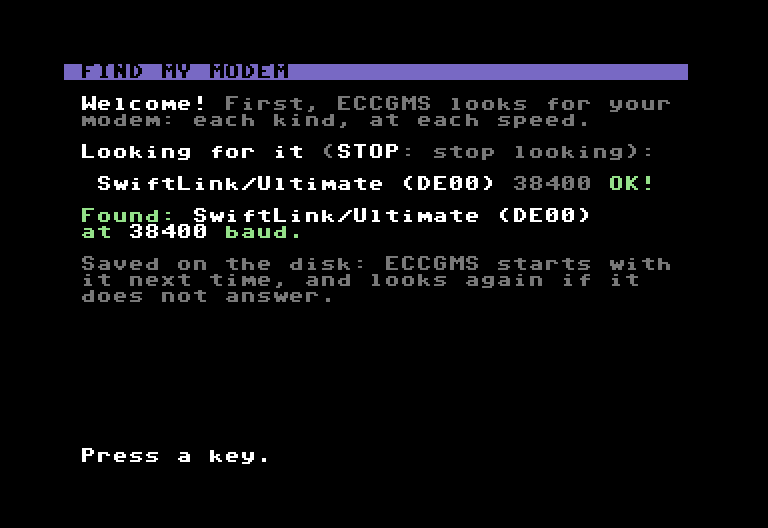
ECCGMS at its first start: it asks each kind of modem at each speed, and says which one answered and at what speed.

It finds your modem by itselfIl trouve votre modem tout seul

At the first start, ECCGMS asks each kind of modem (WiFi modem on the user port, UP9600, SwiftLink, Ultimate) at each speed, keeps the one that answers and saves it on the disk; next time, it checks it again. It also notices a REU (it keeps its buffer there) and a C64C's SID 8580 (it turns the voice up), and it uses the drive it was loaded from. Nothing to set by hand.

Au premier lancement, ECCGMS interroge chaque sorte de modem (modem WiFi sur le port utilisateur, UP9600, SwiftLink, Ultimate) à chaque vitesse, garde celui qui répond et l'enregistre sur la disquette ; la fois suivante, il le vérifie. Il voit aussi tout seul une REU (il y garde son tampon) et la puce SID 8580 d'un C64C (il monte alors le volume de la voix), et il se sert du lecteur d'où il a été chargé. Rien à régler à la main.

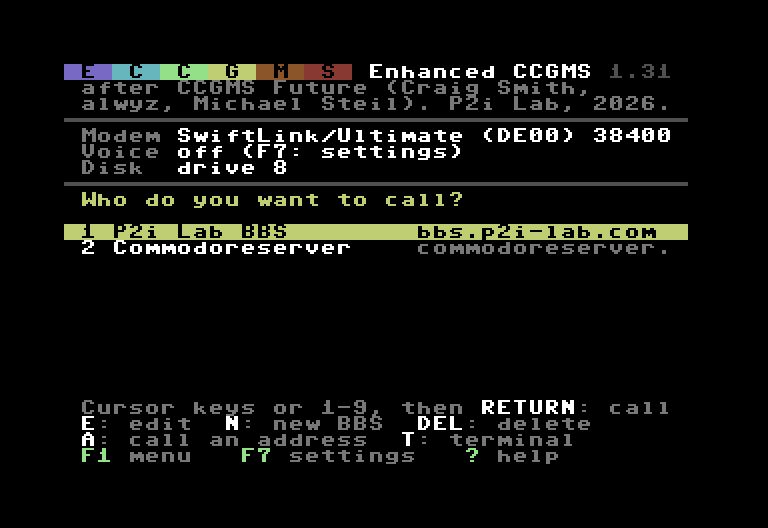
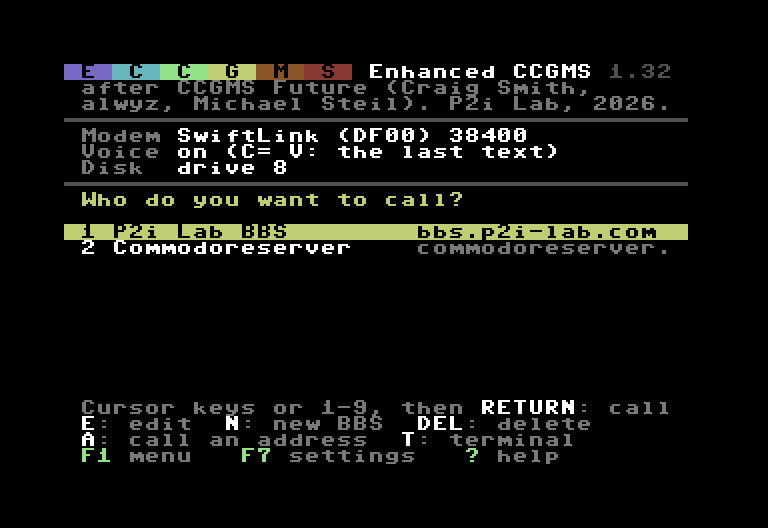
The start screen of ECCGMS: the modem found, the voice, the drive, and the list of BBSes.

Your BBSes, ready to callVos BBS, prêts à appeler

The start screen lists your BBSes, the P2i Lab BBS first. Choose one with the cursor keys or a joystick in port 2, press RETURN (or fire): ECCGMS dials it. E edits, N adds, DEL deletes; the BBS you called last is chosen at the next start.

L'écran d'accueil liste vos BBS, le BBS P2i Lab en premier. Choisissez-en un avec les flèches ou un joystick en port 2, appuyez sur RETURN (ou le bouton de tir) : ECCGMS l'appelle. E modifie, N ajoute, DEL supprime ; le dernier BBS appelé est choisi au démarrage suivant.

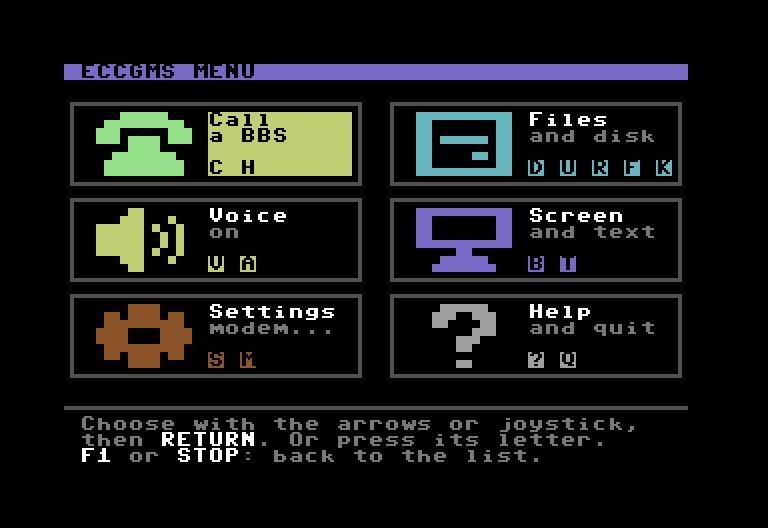
The menu of ECCGMS: six tiles with big icons (Call, Files, Voice, Screen, Settings, Help).

Six big tiles instead of key codesSix grandes tuiles au lieu de codes de touches

F1, online or not: Call, Files, Voice, Screen, Settings, Help. Every action is at most two choices away, and has its own letter for those who know it. F1 again: back to the BBS screen, exactly as it was.

F1, en ligne ou non : Appeler, Fichiers, Voix, Écran, Réglages, Aide. Chaque action est à deux choix au plus, et a sa propre lettre pour ceux qui la connaissent. F1 encore : retour à l'écran du BBS, tel qu'il était.

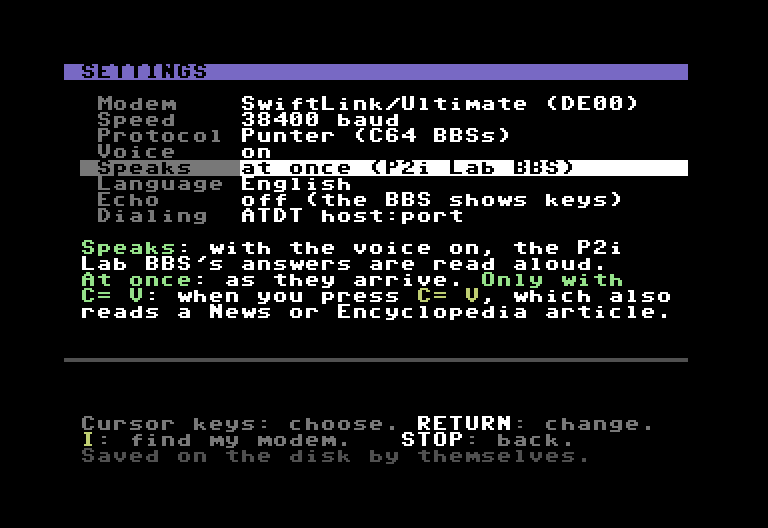
The settings of ECCGMS: modem, speed, protocol, voice, speaks, language, echo, dialing, with the meaning of the line chosen below.

Settings that explain themselvesDes réglages qui s'expliquent

F7: one setting per line, and what it means just below. Every change is saved on the disk by itself: no more "save config" to forget.

F7 : un réglage par ligne, et ce qu'il veut dire juste en dessous. Chaque changement s'enregistre tout seul sur la disquette : plus de « save config » à oublier.

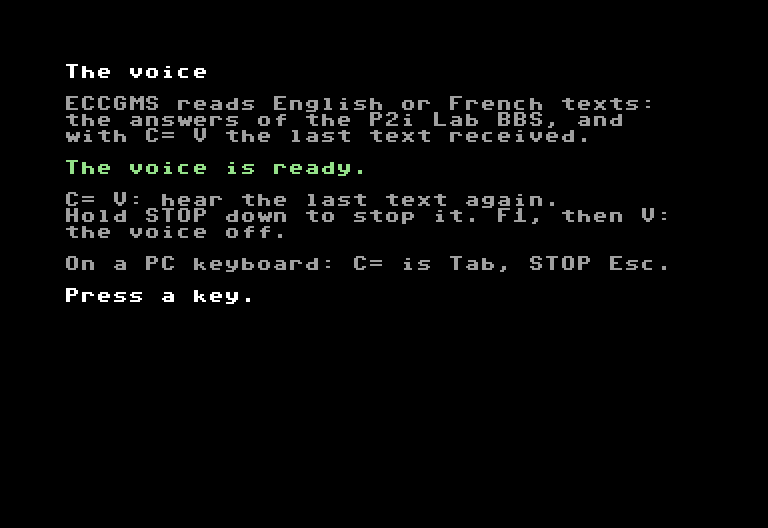
ECCGMS says that its voice is loaded and ready, and how to use it.

A built-in voice that reads the BBSUne voix intégrée qui lit le BBS

A robot voice in the style of SAM, on any C64: no memory expansion needed. On the P2i Lab BBS it reads Claude's answers and your private messages aloud, at once or only when you press C= V (F7, Speaks); C= V also reads an article of its News or Encyclopedia. And in its ECCGMS section (X, then V), as with SAM, you type a sentence and your C64 says it. It speaks English or French: on the P2i Lab BBS, the language you chose there, by itself (or F7, Language).

Une voix de robot façon SAM, sur tout C64 : pas besoin d'extension de mémoire. Sur le BBS P2i Lab, elle lit à voix haute les réponses de Claude et vos messages privés, tout de suite ou seulement quand vous tapez C= V (F7, Speaks) ; C= V lit aussi un article de ses News ou de son Encyclopédie. Et dans sa rubrique ECCGMS (X, puis V), comme avec SAM, vous tapez une phrase et votre C64 la dit. Elle parle anglais ou français : sur le BBS P2i Lab, la langue que vous y avez choisie, toute seule (ou F7, Language).

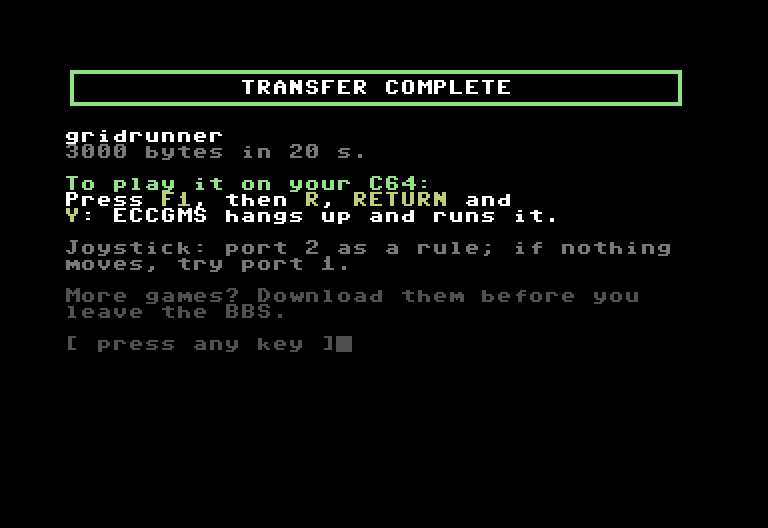
The P2i Lab BBS after ECCGMS saved a game by itself: transfer complete, then F1, R, RETURN and Y to run it.

Downloads that save themselvesDes téléchargements qui s'enregistrent tout seuls

ECCGMS introduces itself to the P2i Lab BBS. Choose a game, a SID tune or a BASIC program there: ECCGMS checks the drive, the disk and the free space, then saves it, with no F3 and no file name to type. Then F1, R: it offers to hang up and run it.

ECCGMS se présente au BBS P2i Lab. Choisissez-y un jeu, une musique SID ou un programme BASIC : ECCGMS vérifie le lecteur, la disquette et la place libre, puis l'enregistre, sans F3 ni nom de fichier à taper. Ensuite F1, R : il propose de raccrocher et de le lancer.

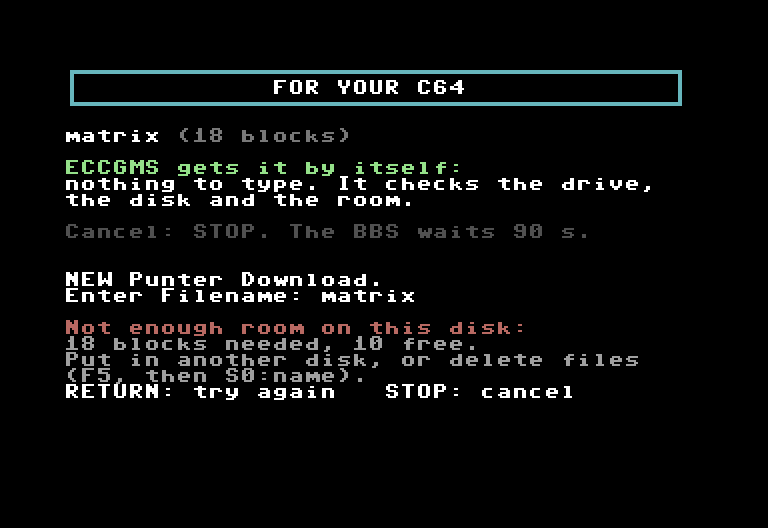
ECCGMS explains that the disk is too full: how many blocks are needed, and how many are free.

Disk problems in plain EnglishLes problèmes de disquette expliqués

No disk, disk full, a file already there, a write-protected disk: ECCGMS says what is wrong and what to do, before the download starts, instead of a drive error number.

Pas de disquette, disquette pleine, un fichier déjà là, une disquette protégée : ECCGMS dit ce qui ne va pas et quoi faire, avant le téléchargement, au lieu d'un numéro d'erreur du lecteur.

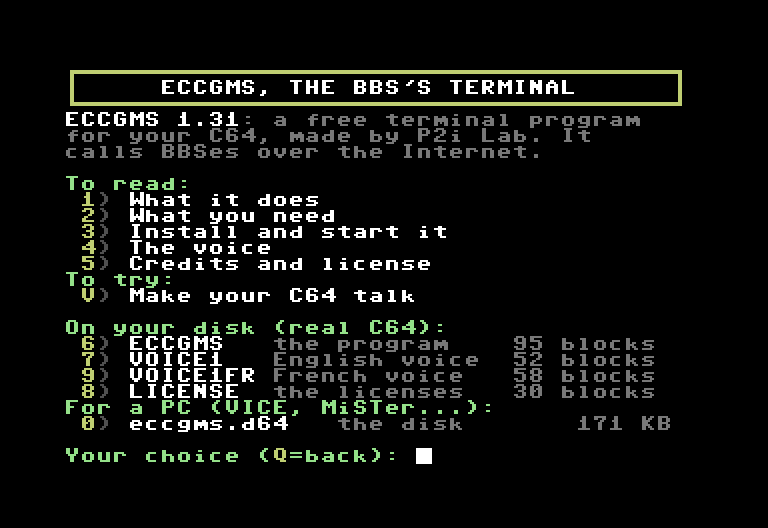
The ECCGMS section of the P2i Lab BBS: pages to read, and ECCGMS, its English and French voices and the licenses to download.

Also on the BBS: press XAussi sur le BBS : touche X

The P2i Lab BBS has an ECCGMS section (X on its main menu): a few pages about it, ECCGMS, its voice and the licenses to download straight onto a real C64's disk, with any terminal program (handy without a PC), and V to make your C64 talk.

Le BBS P2i Lab a une rubrique ECCGMS (X dans son menu principal) : quelques pages pour le présenter, ECCGMS, sa voix et les licences à télécharger directement sur la disquette d'un vrai C64, avec n'importe quel logiciel de terminal (pratique sans PC), et V pour faire parler votre C64.

Also: ECCGMS is compressed, so it loads about 40% faster from a 1541 drive; on a cartridge, it is ready 3 seconds after you switch on. More screens: the keys, the voice, and the full user guide.

Et aussi : ECCGMS est compressé, il se charge environ 40 % plus vite depuis un lecteur 1541 ; en cartouche, il est prêt 3 secondes après l'allumage. Pour aller plus loin : les touches, la voix, et le mode d'emploi complet (en anglais).

New: ECCGMS on a cartridgeNouveau : ECCGMS en cartouche

Switch on: about 3 seconds later, the list of BBSes, the voice on.Allumez : 3 secondes environ plus tard, la liste des BBS, la voix allumée.

ECCGMS started from the cartridge: the list of BBSes, the modem found (a SwiftLink at $DF00, as in VICE) and the voice on.

eccgms.crt

ECCGMS 1.33 in a cartridge file. Switch on, and it is there: nothing to type, nothing to load, its voices included (English and French).

ECCGMS 1.33 dans un fichier de cartouche. Allumez, il est là : rien à taper, rien à charger, ses voix comprises (anglaise et française).

VICE, MiSTer, Ultimate, Kung Fu Flash

  • A file that works as a cartridge, on VICE, a MiSTer, an Ultimate, or a real C64 with a Kung Fu Flash (a cartridge with an SD card).
  • With a blank, formatted disk, eccgms-data.d64: put it in drive 8, and ECCGMS keeps its settings and your downloads on it.
  • The modem must not be at $DE00, the cartridge's address: a WiFi modem on the user port, the MiSTer's UP9600, VICE's ACIA at $DF00, or the Ultimate's at DF80 (how).
  • Inside, the same ECCGMS 1.33, with the same list of BBSes, menus, settings and keys. Hold C= while you switch on to start the C64 without it.
  • Un fichier qui sert de cartouche, sur VICE, un MiSTer, un Ultimate, ou un vrai C64 avec une Kung Fu Flash (une cartouche à carte SD).
  • Avec une disquette vierge formatée, eccgms-data.d64 : mettez-la dans le lecteur 8, ECCGMS y garde ses réglages et vos téléchargements.
  • Le modem ne doit pas être en $DE00, l'adresse de la cartouche : un modem WiFi sur le port utilisateur, l'UP9600 du MiSTer, l'ACIA de VICE en $DF00, ou celle de l'Ultimate en DF80 (comment faire).
  • Dedans, le même ECCGMS 1.33, avec la même liste de BBS, les mêmes menus, réglages et touches. Gardez C= enfoncée à l'allumage pour démarrer le C64 sans lui.
  • 3 sfrom switching on to the list of BBSes. With the disk, from a 1541: 1 to 2 minutes.de l'allumage à la liste des BBS. Avec la disquette, depuis un 1541 : 1 à 2 minutes.
  • < 1 sto load the voice, from the cartridge. From the disk, on a 1541: 30 seconds.pour charger la voix, depuis la cartouche. Depuis la disquette, sur un 1541 : 30 secondes.
  • 1 in 2001 sur 200words that the voice says wrong, on every BBS, instead of 1 in 10: its big dictionary holds 7,990 more words.mots que la voix dit mal, sur tous les BBS, au lieu de 1 sur 10 : son grand dictionnaire a 7 990 mots de plus.

Disk or cartridge?Disquette ou cartouche ?

The disk, eccgms.d64The cartridge, eccgms.crt
Machinesevery C64: a real one (1541, SD2IEC…), a MiSTer, an Ultimate, VICEVICE, a MiSTer, an Ultimate; a real C64 with a Kung Fu Flash
To start itLOAD"ECCGMS",8,1, then RUN: about a minute from a 1541switch on: about 3 seconds
The voiceloads in 30 seconds from a 1541loads in less than a second
Words that the voice says wrongabout 1 in 10; nearly none on the P2i Lab BBSabout 1 in 200; nearly none on the P2i Lab BBS
The modemevery kind ECCGMS knowsnot at $DE00 (how)
Settings, downloadson the ECCGMS diskon the disk in drive 8 (a blank one comes with it)
La disquette, eccgms.d64La cartouche, eccgms.crt
Machinestous les C64 : un vrai (1541, SD2IEC…), un MiSTer, un Ultimate, VICEVICE, un MiSTer, un Ultimate ; un vrai C64 avec une Kung Fu Flash
Pour le lancerLOAD"ECCGMS",8,1, puis RUN : une minute environ depuis un 1541allumer : 3 secondes environ
La voixse charge en 30 secondes depuis un 1541se charge en moins d'une seconde
Mots que la voix dit mal1 sur 10 environ ; presque aucun sur le BBS P2i Lab1 sur 200 environ ; presque aucun sur le BBS P2i Lab
Le modemtoutes les sortes que connaît ECCGMSpas en $DE00 (comment faire)
Réglages, téléchargementssur la disquette d'ECCGMSsur la disquette du lecteur 8 (une vierge est fournie)

Not sure? Take the disk: it works on every C64. Both are free.

Vous hésitez ? Prenez la disquette : elle marche sur tous les C64. Les deux sont gratuites.

How it worksComment ça marche

  1. Your C64Votre C64

    with ECCGMS: a real C64, a MiSTer, an Ultimate, or VICE on a PC

    avec ECCGMS : un vrai C64, un MiSTer, un Ultimate, ou VICE sur un PC

  2. A modemUn modem

    a WiFi modem, or the one the MiSTer, the Ultimate or VICE imitates

    un modem WiFi, ou celui qu'imite le MiSTer, l'Ultimate ou VICE

  3. Internet

    the modem calls an address, as a phone calls a number

    le modem appelle une adresse, comme un téléphone appelle un numéro

  4. The P2i Lab BBSLe BBS P2i Lab

    on its server: bbs.p2i-lab.com

    sur son serveur : bbs.p2i-lab.com

Your C64 can't go on the Internet by itself: the modem links it to the Internet. ECCGMS, the program on the disk eccgms.d64 (or in the cartridge eccgms.crt), talks to the modem and calls the BBS, a bit like a phone call; then it shows what the BBS sends, and sends it what you type.

Votre C64 ne va pas tout seul sur Internet : c'est le modem qui l'y relie. ECCGMS, le programme de la disquette eccgms.d64 (ou de la cartouche eccgms.crt), parle au modem et appelle le BBS, un peu comme un coup de téléphone ; ensuite il affiche ce que le BBS envoie, et lui envoie ce que vous tapez.

What you needCe qu'il vous faut

  • A C64: a real one, a MiSTer, an Ultimate 64 or C64 Ultimate, or the VICE emulator on a PC.
  • A modem to the Internet: a WiFi modem plugged into a real C64. The MiSTer, the Ultimate and VICE can imitate one: see Prepare your machine.
  • The ECCGMS disk in the drive: one file to download, eccgms.d64. Or the cartridge, with a blank disk for your settings and downloads.
  • Un C64 : un vrai, un MiSTer, un Ultimate 64 ou un C64 Ultimate, ou l'émulateur VICE sur un PC.
  • Un modem vers Internet : un modem WiFi branché sur un vrai C64. Le MiSTer, l'Ultimate et VICE savent en imiter un : voir Préparer votre machine.
  • La disquette d'ECCGMS dans le lecteur : un seul fichier à télécharger, eccgms.d64. Ou la cartouche, avec une disquette vierge pour vos réglages et téléchargements.

The voice is an extra: it is on the same disk (or in the cartridge), and off until you turn it on.

La voix est un bonus : elle est sur la même disquette (ou dans la cartouche), et coupée tant que vous ne l'allumez pas.

DownloadTélécharger

These are the files of the latest official version: ECCGMS 1.33, November 3, 2026, on a disk and on a cartridge. If yours is older, take it again (on a real C64, the BBS gives you ECCGMS and its voices: X, then 6, 7 and 9).

Voici les fichiers de la dernière version officielle : ECCGMS 1.33, du 3 novembre 2026, sur disquette et en cartouche. Si la vôtre est plus ancienne, reprenez-la (sur un vrai C64, le BBS vous donne ECCGMS et ses voix : X, puis 6, 7 et 9).

Take one of the two: the disk, eccgms.d64, for every C64, or the cartridge, eccgms.crt, the fastest, for VICE, a MiSTer, an Ultimate or a Kung Fu Flash. Either one is all you need. The zip is for copying the files one by one; the source code is for programmers.

Prenez l'une des deux : la disquette, eccgms.d64, pour tous les C64, ou la cartouche, eccgms.crt, la plus rapide, pour VICE, un MiSTer, un Ultimate ou une Kung Fu Flash. L'une ou l'autre suffit. Le zip sert à copier les fichiers un par un ; le code source est pour les programmeurs.

For every C64Pour tous les C64

The diskLa disquette

A disk image (a copy of a C64 floppy disk, in a file) with ECCGMS, its voices (English and French) and the licenses. Use it in VICE, a MiSTer, an Ultimate or an SD2IEC, or write it to a real floppy.

Une image disque (la copie d'une disquette de C64, dans un fichier) avec ECCGMS, ses voix (anglaise et française) et les licences. Elle sert dans VICE, un MiSTer, un Ultimate ou une SD2IEC, ou s'écrit sur une vraie disquette.

eccgms.d64 (171 KB)(171 Ko)

New: the fastestNouveau : la plus rapide

The cartridgeLa cartouche

eccgms.crt, ready 3 seconds after you switch on, with a blank, formatted disk for drive 8 (eccgms-data.d64: ECCGMS keeps its settings and your downloads on it), the user guide and the licenses. For VICE, a MiSTer, an Ultimate, or a real C64 with a Kung Fu Flash.

eccgms.crt, prête 3 secondes après l'allumage, avec une disquette vierge formatée pour le lecteur 8 (eccgms-data.d64 : ECCGMS y garde ses réglages et vos téléchargements), le mode d'emploi (en anglais) et les licences. Pour VICE, un MiSTer, un Ultimate, ou un vrai C64 avec une Kung Fu Flash.

ECCGMS-1.33-cartridge.zip (127 KB)(127 Ko)

The zip (files one by one)Le zip (fichiers séparés)

The same disk, plus the same programs as separate files (ECCGMS, VOICE1, VOICE1FR) to copy onto your own disk or SD card, the user guide and the licenses. You don't need it if you took the disk.

La même disquette, plus les mêmes programmes en fichiers séparés (ECCGMS, VOICE1, VOICE1FR), à copier sur votre propre disquette ou carte SD, le mode d'emploi (en anglais) et les licences. Inutile si vous avez pris la disquette.

ECCGMS-1.33.zip (116 KB)(116 Ko)

Source code (for programmers)Code source (pour programmeurs)

Not needed to use ECCGMS. 6502 assembly (ca65) and Python. To build it, disk and cartridge: cc65, Python 3, then bash fabriquer.sh.

Inutile pour se servir d'ECCGMS. Assembleur 6502 (ca65) et Python. Pour le compiler, disquette et cartouche : cc65, Python 3, puis bash fabriquer.sh.

ECCGMS-1.33-source.zip (476 KB)(476 Ko)

A real C64 and no PC? Call the P2i Lab BBS with the terminal program you already have (CCGMS or another) and press X on its main menu: ECCGMS, its voice and the licenses go straight onto your floppy disk. The BBS tells you the names to use and what to type next.

Un vrai C64 et pas de PC ? Appelez le BBS P2i Lab avec le logiciel de terminal que vous avez déjà (CCGMS ou un autre) et tapez X dans son menu principal : ECCGMS, sa voix et les licences arrivent directement sur votre disquette. Le BBS vous dit les noms à donner et quoi taper ensuite.

Next: prepare your machine, then start ECCGMS. The full guide, in English: read it online, or MANUAL.md in the zips.

Ensuite : préparez votre machine, puis lancez ECCGMS. Le mode d'emploi complet, en anglais : à lire en ligne, ou MANUAL.md dans les zips.

Prepare your machinePréparer votre machine

Two things to prepare: the modem, and the disk in drive 8. A .d64 file is a copy of a whole C64 floppy disk: your machine uses it like a real disk in drive 8. Leave it there while you use ECCGMS: ECCGMS saves its settings and your downloads on it, and loads the voice from it, so it must not be write-protected. Each card says how, for your machine. With the cartridge, see its own card: the disk is the blank one that comes with it, and the modem must not be at $DE00.

Deux choses à préparer : le modem, et la disquette dans le lecteur 8. Un fichier .d64 est la copie d'une disquette de C64 entière : votre machine s'en sert comme d'une vraie disquette, dans le lecteur 8. Laissez-la pendant que vous utilisez ECCGMS : il y enregistre ses réglages et vos téléchargements, et y prend la voix ; elle ne doit donc pas être protégée en écriture. Chaque carte dit comment faire, selon votre machine. Avec la cartouche, voyez sa carte : la disquette est la vierge fournie avec elle, et le modem ne doit pas être en $DE00.

MiSTer FPGA

  1. Copy eccgms.d64 to the MiSTer's SD card, for example into games/C64. The MiSTer must be connected to your network.
  2. Start the C64 core. In its menu (F12), Hardware: Expansion: RS232, RS232 Connection: Internal, RS232 mode: UP9600.
  3. In the MiSTer's own menu (Win+F12): Uart Connection: Modem, Link: TCP, Baud: 9600. Save.
  4. In the core's menu, mount eccgms.d64 in drive 8: the MiSTer writes the settings and your downloads into this file.
  1. Copiez eccgms.d64 sur la carte SD du MiSTer, par exemple dans games/C64. Le MiSTer doit être relié à votre réseau.
  2. Lancez le cœur C64. Dans son menu (F12), Hardware : Expansion : RS232, RS232 Connection : Internal, RS232 mode : UP9600.
  3. Dans le menu du MiSTer lui-même (Win+F12) : Uart Connection : Modem, Link : TCP, Baud : 9600. Enregistrez.
  4. Dans le menu du cœur, montez eccgms.d64 en lecteur 8 : le MiSTer écrit les réglages et vos téléchargements dans ce fichier.

ECCGMS then finds “UP9600 (user port)” at 9600 baud by itself. The MiSTer's guide: Computer Core Networking; the core: C64_MiSTer.

ECCGMS trouve alors tout seul « UP9600 (user port) », à 9600 bauds. Le guide du MiSTer (en anglais) : Computer Core Networking ; le cœur : C64_MiSTer.

Ultimate 64, C64 Ultimate, Ultimate II+

  1. Connect the Ultimate to your network.
  2. In its menu (firmware 3.7 or later), turn on the modem: ACIA / SwiftLink (the modem cartridge it imitates), at address $DE00 (where the C64 looks for it).
  3. Copy eccgms.d64 to the Ultimate's USB stick or SD card. In its menu, choose the file, then Mount Disk (drive 8).
  1. Reliez l'Ultimate à votre réseau.
  2. Dans son menu (firmware 3.7 ou plus récent), activez le modem : ACIA / SwiftLink (la cartouche modem qu'il imite), à l'adresse $DE00 (là où le C64 le cherche).
  3. Copiez eccgms.d64 sur la clé USB ou la carte SD de l'Ultimate. Dans son menu, choisissez le fichier, puis Mount Disk (lecteur 8).

ECCGMS then finds “SwiftLink/Ultimate (DE00)” at 38400 baud by itself. The Ultimate's guide: Modem support.

ECCGMS trouve alors tout seul « SwiftLink/Ultimate (DE00) », à 38400 bauds. Le guide de l'Ultimate (en anglais) : Modem support.

VICE (emulator)VICE (émulateur)

  1. Install VICE (free), and Java 21 or later.
  2. VICE imitates a SwiftLink (a C64 serial cartridge), but not the modem plugged into it: a small free program on your computer plays the modem. Get TCPSerial, unzip it and double-click TCPSerial.bat; its settings are fine as they are. Leave its window open while you use ECCGMS. If Windows stops TCPSerial.bat (a blue “Windows protected your PC” window), double-click TCPSerial.jar instead: it then runs with no window, until you turn the computer off. If Windows' firewall asks about Java, Cancel is enough: VICE is on the same computer.
  3. In VICE (x64sc), open the settings, page RS232: ACIA on, $DE00, NMI, SwiftLink, on device 3 (Serial 3); device 3: 127.0.0.1:25232, 38400 baud, IP232 off (unchecked: TCPSerial passes the bytes as they are; with IP232 on, VICE spoils the files you download); user port RS232: off. Then Preferences menu, Save settings: VICE does not keep its settings by itself when it closes. (The menus change a little from one VICE version to another.)
  4. Drag eccgms.d64 onto VICE's window: VICE puts it in drive 8 and starts ECCGMS. (Or: File menu, Attach disk image, drive 8.)
  1. Installez VICE (gratuit), et Java 21 ou plus récent.
  2. VICE imite une SwiftLink (une cartouche série pour C64), mais pas le modem qu'on y branche : un petit programme gratuit, sur votre ordinateur, joue le rôle du modem. Prenez TCPSerial, dézippez-le et double-cliquez sur TCPSerial.bat ; ses réglages conviennent tels quels. Laissez sa fenêtre ouverte pendant que vous utilisez ECCGMS. Si Windows bloque TCPSerial.bat (une fenêtre bleue « Windows a protégé votre ordinateur »), double-cliquez plutôt sur TCPSerial.jar : il tourne alors sans fenêtre, jusqu'à ce que vous éteigniez l'ordinateur. Si le pare-feu de Windows pose une question sur Java, Annuler suffit : VICE est sur le même ordinateur.
  3. Dans VICE (x64sc), ouvrez les réglages, page RS232 : ACIA activée, $DE00, NMI, SwiftLink, sur le périphérique 3 (Serial 3) ; périphérique 3 : 127.0.0.1:25232, 38400 bauds, IP232 décoché (TCPSerial passe les octets tels quels ; avec IP232 coché, VICE abîme les fichiers téléchargés) ; RS232 du port utilisateur : désactivé. Puis menu Preferences, Save settings : VICE ne garde pas ses réglages tout seul en se fermant. (Les menus changent un peu d'une version de VICE à l'autre.)
  4. Glissez eccgms.d64 sur la fenêtre de VICE : VICE la met dans le lecteur 8 et lance ECCGMS. (Ou : menu File, Attach disk image, lecteur 8.)

Linux or macOS: TCPSerial works too: java -jar TCPSerial.jar, in its folder.

Linux ou macOS : TCPSerial marche aussi : java -jar TCPSerial.jar, dans son dossier.

A real C64 and a WiFi modemUn vrai C64 et un modem WiFi

  1. Turn the C64 off. Plug the WiFi modem into the user port (or a SwiftLink cartridge and its modem into the cartridge port), then turn the C64 on.
  2. The modem must be connected to your WiFi: follow its own manual. (To type its commands, start ECCGMS and press T on its list of BBSes. Type AT, then RETURN: it should answer OK.)
  3. The disk: with an SD2IEC (an SD card drive for the C64), copy eccgms.d64 to its SD card and open it, with a file browser or with OPEN1,8,15,"CD:ECCGMS.D64":CLOSE1. With a real 1541, write the image to a floppy from a PC first (for example with OpenCBM and a ZoomFloppy cable). Don't write-protect it.
  4. If calling gives ERROR (some modems do, for example those with the Zimodem firmware), choose ATD"host:port" in the settings (F7, Dialing).
  1. Éteignez le C64. Branchez le modem WiFi sur le port utilisateur (ou une cartouche SwiftLink et son modem sur le port cartouche), puis rallumez.
  2. Le modem doit être relié à votre WiFi : suivez son propre mode d'emploi. (Pour taper ses commandes, lancez ECCGMS et appuyez sur T dans sa liste de BBS. Tapez AT, puis RETURN : il doit répondre OK.)
  3. La disquette : avec une SD2IEC (un lecteur de carte SD pour le C64), copiez eccgms.d64 sur sa carte SD et ouvrez-la, avec un navigateur de fichiers ou avec OPEN1,8,15,"CD:ECCGMS.D64":CLOSE1. Avec un vrai 1541, écrivez d'abord l'image sur une disquette depuis un PC (par exemple avec OpenCBM et un câble ZoomFloppy). Ne la protégez pas en écriture.
  4. Si l'appel répond ERROR (c'est le cas de certains modems, par exemple ceux qui ont le logiciel Zimodem), choisissez ATD"host:port" dans les réglages (F7, ligne Dialing).

ECCGMS finds the modem by itself.

ECCGMS trouve le modem tout seul.

The cartridge (eccgms.crt)La cartouche (eccgms.crt)

Unzip ECCGMS-1.33-cartridge.zip. Three things: the blank disk, eccgms-data.d64, in drive 8 (ECCGMS keeps its settings and your downloads on it); the modem, which must not be at $DE00, the cartridge's address (the usual one of a SwiftLink); then the cartridge, last: it starts the C64 with ECCGMS.

Dézippez ECCGMS-1.33-cartridge.zip. Trois choses : la disquette vierge, eccgms-data.d64, dans le lecteur 8 (ECCGMS y garde ses réglages et vos téléchargements) ; le modem, qui ne doit pas être en $DE00, l'adresse de la cartouche (celle d'habitude d'une SwiftLink) ; puis la cartouche, en dernier : elle démarre le C64 avec ECCGMS.

VICE

  • Disk: File menu, Attach disk image, drive 8: eccgms-data.d64.
  • Modem: as in the VICE card above, but the ACIA at $DF00 instead of $DE00, and VICE's REU off (it is at $DF00 too).
  • Cartridge: File menu, Attach cartridge image, eccgms.crt (or drag it onto VICE's window): VICE restarts the C64 with it.

MiSTer FPGA

  • Disk: copy eccgms-data.d64 and eccgms.crt to the MiSTer's SD card (for example into games/C64); in the core's menu (F12), mount eccgms-data.d64 in drive 8.
  • Modem: UP9600, as in the MiSTer card above.
  • Cartridge: in the core's menu, load eccgms.crt as a cartridge.
  • Every time? In the core's menu, Hardware, Boot Cartridge: eccgms.crt. The C64 core then starts with ECCGMS.

Ultimate 64, C64 Ultimate, Ultimate II+

  • Disk: copy eccgms-data.d64 and eccgms.crt to its USB stick or SD card; in its menu, choose eccgms-data.d64, then Mount Disk (drive 8).
  • Modem: as in the Ultimate card above, but at DF80/NMI (ACIA (6551) Mapping); ECCGMS calls it “Ultimate (DF80)”.
  • Cartridge: choose eccgms.crt, then Run Cart.

A real C64 and a Kung Fu Flash

  • Disk: in drive 8, an SD2IEC or a real floppy, not write-protected: ECCGMS keeps its settings and your downloads on it.
  • Modem: a WiFi modem on the user port.
  • Cartridge: copy eccgms.crt to the SD card of the Kung Fu Flash (a cartridge with an SD card), then choose it in its menu.

VICE

  • Disquette : menu File, Attach disk image, lecteur 8 : eccgms-data.d64.
  • Modem : comme sur la carte VICE plus haut, mais l'ACIA en $DF00 au lieu de $DE00, et la REU de VICE désactivée (elle est aussi en $DF00).
  • Cartouche : menu File, Attach cartridge image, eccgms.crt (ou glissez-la sur la fenêtre de VICE) : VICE redémarre le C64 avec elle.

MiSTer FPGA

  • Disquette : copiez eccgms-data.d64 et eccgms.crt sur la carte SD du MiSTer (par exemple dans games/C64) ; dans le menu du cœur (F12), montez eccgms-data.d64 en lecteur 8.
  • Modem : UP9600, comme sur la carte MiSTer plus haut.
  • Cartouche : dans le menu du cœur, chargez eccgms.crt comme cartouche.
  • À chaque fois ? Dans le menu du cœur, Hardware, Boot Cartridge : eccgms.crt. Le cœur C64 démarre alors avec ECCGMS.

Ultimate 64, C64 Ultimate, Ultimate II+

  • Disquette : copiez eccgms-data.d64 et eccgms.crt sur sa clé USB ou sa carte SD ; dans son menu, choisissez eccgms-data.d64, puis Mount Disk (lecteur 8).
  • Modem : comme sur la carte Ultimate plus haut, mais en DF80/NMI (ACIA (6551) Mapping) ; ECCGMS l'appelle « Ultimate (DF80) ».
  • Cartouche : choisissez eccgms.crt, puis Run Cart.

Un vrai C64 et une Kung Fu Flash

  • Disquette : dans le lecteur 8, une SD2IEC ou une vraie disquette, non protégée en écriture : ECCGMS y garde ses réglages et vos téléchargements.
  • Modem : un modem WiFi sur le port utilisateur.
  • Cartouche : copiez eccgms.crt sur la carte SD de la Kung Fu Flash (une cartouche à carte SD), puis choisissez-la dans son menu.

ECCGMS finds the modem by itself. Hold C= while you switch on: the C64 starts without the cartridge (BASIC). On a Kung Fu Flash, its menu button brings back its menu, where you choose eccgms.crt again.

ECCGMS trouve le modem tout seul. Gardez C= enfoncée à l'allumage : le C64 démarre sans la cartouche (BASIC). Sur une Kung Fu Flash, son bouton de menu ramène son menu, où vous choisissez de nouveau eccgms.crt.

To…Software (free)
Imitate a C64 on a PCVICE (for Windows: its download page)
Give VICE a modemTCPSerial, for Windows, Linux and macOS; it needs Java 21 or later
Call the BBS from a PCSyncTERM (no C64 needed: C64 mode, font “Commodore 64 (Lower)”)
MiSTerits modem: Computer Core Networking; the C64 core: C64_MiSTer
Ultimateits modem: Modem support
A WiFi modemthe firmware of many of them: Zimodem
The disk on a real C64an SD2IEC, or OpenCBM and a ZoomFloppy cable to write a floppy
The cartridge on a real C64a Kung Fu Flash: it runs .crt files from an SD card
Pour…Logiciel (gratuit)
Imiter un C64 sur un PCVICE (pour Windows : sa page de téléchargement)
Donner un modem à VICETCPSerial, pour Windows, Linux et macOS ; il demande Java 21 ou plus récent
Appeler le BBS depuis un PCSyncTERM (sans C64 : mode C64, police « Commodore 64 (Lower) »)
MiSTerson modem : Computer Core Networking ; le cœur C64 : C64_MiSTer (en anglais)
Ultimateson modem : Modem support (en anglais)
Un modem WiFile logiciel de beaucoup d'entre eux : Zimodem
La disquette sur un vrai C64une SD2IEC, ou OpenCBM et un câble ZoomFloppy pour écrire une disquette
La cartouche sur un vrai C64une Kung Fu Flash : elle fait tourner les fichiers .crt d'une carte SD (en anglais)

A few wordsQuelques mots

BBS
a server you call to chat, read messages and download programs.
Terminal program
the program that lets the C64 call it: ECCGMS.
Modem
the box (or its imitation) that links the C64 to the Internet.
.d64
a copy of a C64 floppy disk, in a file.
.crt
a cartridge in a file: VICE, a MiSTer, an Ultimate or a Kung Fu Flash uses it like a real cartridge.
Drive 8, 1541
the C64's first disk drive; the 1541 is Commodore's floppy drive.
REU
extra memory (RAM Expansion Unit): not needed; if there is one, ECCGMS keeps its buffer in it.
SwiftLink, ACIA, $DE00
a serial cartridge for modems; the Ultimate and VICE imitate it; $DE00 is where the C64 finds it (with the ECCGMS cartridge: $DF00 or $DF80).
User port, UP9600
the C64's connector at the back for modems; UP9600 is a fast way to use it (the MiSTer's).
Kung Fu Flash
a cartridge with an SD card, for a real C64: it runs .crt files.
PETSCII
the C64's own characters and graphics.
Punter, XMODEM
ways for a BBS to send you files.
BBS
un serveur qu'on appelle pour discuter, lire des messages et télécharger des programmes.
Logiciel de terminal
le programme qui permet au C64 de l'appeler : ECCGMS.
Modem
le boîtier (ou son imitation) qui relie le C64 à Internet.
.d64
la copie d'une disquette de C64, dans un fichier.
.crt
une cartouche dans un fichier : VICE, un MiSTer, un Ultimate ou une Kung Fu Flash s'en sert comme d'une vraie cartouche.
Lecteur 8, 1541
le premier lecteur de disquette du C64 ; le 1541 est le lecteur de disquette de Commodore.
REU
une extension de mémoire (RAM Expansion Unit) : inutile ; s'il y en a une, ECCGMS y garde son tampon.
SwiftLink, ACIA, $DE00
une cartouche série pour les modems ; l'Ultimate et VICE l'imitent ; $DE00 est l'adresse où le C64 la trouve (avec la cartouche ECCGMS : $DF00 ou $DF80).
Port utilisateur, UP9600
la prise à l'arrière du C64 pour les modems ; UP9600 est une façon rapide de s'en servir (celle du MiSTer).
Kung Fu Flash
une cartouche à carte SD, pour un vrai C64 : elle fait tourner les fichiers .crt.
PETSCII
les caractères et graphismes propres au C64.
Punter, XMODEM
des façons, pour un BBS, de vous envoyer des fichiers.

Start ECCGMSLancer ECCGMS

When your machine is ready and the disk is in drive 8:

Quand votre machine est prête et la disquette dans le lecteur 8 :

  1. Type, on the C64's blue screen: LOAD"ECCGMS",8,1 then RETURN, then RUN then RETURN. (On a C64 keyboard, " is SHIFT + 2. In VICE, if you dragged the disk onto the window, ECCGMS has already started: skip this step.) The C64 shows “UNPACKING...” for about 4 seconds. With the cartridge: nothing to type; switch on, and ECCGMS is there about 3 seconds later.
  2. The first time only, ECCGMS looks for your modem. When it has found it, press RETURN. (If it finds none, check “Prepare your machine” above, then press F7, then I: find my modem.)
  3. The list of BBSes appears. The P2i Lab BBS is first: press RETURN to call it.
  1. Tapez, sur l'écran bleu du C64 : LOAD"ECCGMS",8,1 puis RETURN, puis RUN puis RETURN. (Sur un clavier de C64, le " se tape avec SHIFT + 2. Dans VICE, si vous avez glissé la disquette sur la fenêtre, ECCGMS est déjà lancé : passez cette étape.) Le C64 affiche « UNPACKING... » (décompression) pendant 4 secondes environ. Avec la cartouche : rien à taper ; allumez, et ECCGMS est là 3 secondes environ plus tard.
  2. La première fois seulement, ECCGMS cherche votre modem. Quand il l'a trouvé, appuyez sur RETURN. (S'il n'en trouve pas, vérifiez « Préparer votre machine » plus haut, puis F7, puis I : find my modem.)
  3. La liste des BBS s'affiche. Le BBS P2i Lab est le premier : appuyez sur RETURN pour l'appeler.

Your first callVotre premier appel

  1. On the BBS's first screen, press 3 (Commodore 64, English) or 1 (Commodore 64, French).
  2. At “Handle”, type new, then choose your handle (your nickname) and a password. The next times, type your handle and your password.
  3. To hang up: C= STOP (hold the Commodore key and press RUN/STOP; on a PC keyboard: Tab + Esc).
  1. Sur le premier écran du BBS, tapez 1 (Commodore 64 en français) ou 3 (en anglais).
  2. À « Pseudo », tapez nouveau, puis choisissez votre pseudo et un mot de passe. Les fois suivantes, tapez votre pseudo et votre mot de passe.
  3. Pour raccrocher : C= STOP (gardez la touche Commodore enfoncée et appuyez sur RUN/STOP ; sur un clavier de PC : Tab + Échap).

Good to knowBon à savoir

  • The voice: nothing more to download. It is on the disk, and off at first. To turn it on: F1, then V (or F7, line Voice). ECCGMS loads it from the disk by itself, then again at each start, until you turn it off (with the cartridge: from the cartridge, in under a second). See The voice.
  • Leave the disk in the drive: ECCGMS saves its settings on it by itself, and your downloads go there.
  • ECCGMS's own screens are in English. The BBS speaks English or French: you choose on its first screen.
  • The full guide, in English: read it online, or MANUAL.md in the zips.
  • La voix : rien d'autre à télécharger. Elle est sur la disquette, et coupée au départ. Pour l'allumer : F1, puis V (ou F7, ligne Voice). ECCGMS la charge tout seul depuis la disquette, puis à chaque démarrage, tant que vous ne la coupez pas (avec la cartouche : depuis la cartouche, en moins d'une seconde). Voir La voix.
  • Laissez la disquette dans le lecteur : ECCGMS y enregistre ses réglages tout seul, et vos téléchargements y vont.
  • Les écrans d'ECCGMS sont en anglais. Le BBS parle français ou anglais : vous choisissez sur son premier écran.
  • Le mode d'emploi complet, en anglais : à lire en ligne, ou MANUAL.md dans les zips.

The keysLes touches

The list of BBSes
Cursor keys, joystick (port 2), 1‑9choose a BBS
RETURN, the fire buttoncall the BBS chosen
Eedit the BBS chosen
Nadd a BBS
DELdelete the BBS chosen
Acall an address you type (host:port)
Tthe terminal, without calling (to type the modem's commands)
F1the menu
F7the settings
?the help
La liste des BBS
Flèches, joystick (port 2), 1‑9choisir un BBS
RETURN, le bouton de tirappeler le BBS choisi
Emodifier le BBS choisi
Najouter un BBS
DELsupprimer le BBS choisi
Aappeler une adresse tapée (host:port)
Tle terminal, sans appeler (pour taper les commandes du modem)
F1le menu
F7les réglages
?l'aide
In the terminal (online)
F1the menu; F1 again: back to the BBS, as it was
F2read a text file on the screen (R), or send one (S)
F3download a file
F4the buffer: a copy of what the BBS sends
F5a command for the disk drive
F6the files on the disk
F7the settings
F8change the text mode: PETSCII (C64 BBSes), ASCII (PC BBSes), 80 columns
C= Vread the last text aloud (with the voice on)
C= STOPhang up
CTRL F5send your user name for this BBS
CTRL F7send your password for this BBS
Dans le terminal (en ligne)
F1le menu ; F1 encore : retour au BBS, tel qu'il était
F2lire un fichier texte à l'écran (R), ou l'envoyer (S)
F3télécharger un fichier
F4le tampon : une copie de ce qu'envoie le BBS
F5une commande pour le lecteur de disquette
F6les fichiers de la disquette
F7les réglages
F8changer le mode texte : PETSCII (BBS pour C64), ASCII (BBS pour PC), 80 colonnes
C= Vrelire le dernier texte à voix haute (voix allumée)
C= STOPraccrocher
CTRL F5envoyer votre identifiant pour ce BBS
CTRL F7envoyer votre mot de passe pour ce BBS

C= is the Commodore key (bottom left, with the Commodore logo). STOP is the RUN/STOP key. On a C64 keyboard, F2, F4, F6 and F8 are SHIFT + F1, F3, F5 and F7.

C= est la touche Commodore (en bas à gauche, avec le logo Commodore). STOP est la touche RUN/STOP. Sur un clavier de C64, F2, F4, F6 et F8 se tapent avec SHIFT + F1, F3, F5 et F7.

On a PC keyboard (VICE, MiSTer)Sur un clavier de PC (VICE, MiSTer)

C64 keyVICEMiSTer
RUN/STOPEscEsc
C= (Commodore)TabTab or Alt
CTRLCtrlCtrl
CLR/HOMEHomeHome
INST/DELBackspaceBackspace
RESTOREPage UpF11
F2, F4, F6, F8F2, F4, F6, F8 (no SHIFT)the same
Touche du C64VICEMiSTer
RUN/STOPÉchapÉchap
C= (Commodore)TabTab ou Alt
CTRLCtrlCtrl
CLR/HOMEDébut (Home, ↖)Début
INST/DELRetour arrière (⟵)Retour arrière
RESTOREPage précédente (Pg ↑)F11
F2, F4, F6, F8F2, F4, F6, F8 (sans SHIFT)pareil

So C= STOP (hang up) is Tab + Esc, and C= V (read aloud) is Tab + V: hold Tab down, then press the other key. In VICE set to the positional keyboard (Settings, Input devices, Keyboard), C= is Ctrl and CTRL is Tab. ECCGMS shows these keys too: F1, then ?, then RETURN.

Donc C= STOP (raccrocher) se fait avec Tab + Échap, et C= V (lire à voix haute) avec Tab + V : gardez Tab enfoncée, puis appuyez sur l'autre touche. Dans VICE réglé en clavier positionnel (Settings, Input devices, Keyboard), C= est Ctrl et CTRL est Tab. ECCGMS montre aussi ces touches : F1, puis ?, puis RETURN.

The voiceLa voix

The voice is optional, and off at first. It is already on the ECCGMS disk (the files VOICE1, English, and VOICE1FR, French): there is nothing else to download, and it works on any C64, with no memory expansion. To turn it on: F1, then V (press again: off), or F7, line Voice. ECCGMS then loads it from the disk by itself (about 30 seconds from a 1541; from the cartridge, in under a second), and again at each start, until you turn it off; not this time? STOP skips it. It is a robot voice in the style of SAM (1982), with very clear consonants, and it starts speaking about 0.3 s after the text.

La voix est facultative, et coupée au départ. Elle est déjà sur la disquette d'ECCGMS (les fichiers VOICE1, anglais, et VOICE1FR, français) : il n'y a rien d'autre à télécharger, et elle marche sur tout C64, sans extension de mémoire. Pour l'allumer : F1, puis V (encore une fois : coupée), ou F7, ligne Voice. ECCGMS la charge alors tout seul depuis la disquette (30 secondes environ depuis un 1541 ; depuis la cartouche, en moins d'une seconde), puis à chaque démarrage, tant que vous ne la coupez pas ; pas cette fois-ci ? STOP passe le chargement. C'est une voix de robot façon SAM (1982), aux consonnes très nettes, qui commence à parler 0,3 s environ après le texte.

With the voice on, ECCGMS reads aloud the answers of the P2i Lab BBS (Claude's, and your private messages) and, with C= V, the last text received. In the BBS's News and Encyclopedia, C= V reads just the article, page by page: its title and its text, not the menus or the link. Rather hear the BBS's answers only when you want? F7, line Speaks: only with C= V. To try it: on the BBS, X (the ECCGMS section), then V: type a sentence, and your C64 says it.

It reads a text as you would aloud: hours (5 p.m., 9 AM, 7:15), numbers (1,250, 2.5 million, -3, 10-15), ordinals and decades (13th, 21st, the 1980s), money and signs ($5, 50%, #1), abbreviations (Mr., Dr., etc., e.g., U.S.) and acronyms (FBI, US letter by letter; SID, RAM as words). English spelling is irregular: it knows about 250 common words by heart, and says about 9 words in 10 exactly; rare words and names can sound odd. With the P2i Lab BBS, nearly every word is right: the BBS knows exactly what the voice would say, and after each text, it whispers to it, hidden, the right sounds of the words it would get wrong, from the Carnegie Mellon University dictionary (125,000 words). C= V says them right too. With the cartridge, on every BBS, the voice also knows 7,990 more words by heart, the most common ones that its rules would get wrong (its big dictionary, also drawn from CMU's): it says about 1 word in 200 wrong, instead of 1 in 10.

Voix allumée, ECCGMS lit à voix haute les réponses du BBS P2i Lab (celles de Claude, et vos messages privés) et, avec C= V, le dernier texte reçu. Dans les News et l'Encyclopédie du BBS, C= V lit seulement l'article, page par page : son titre et son texte, sans les menus ni le lien. Vous préférez entendre les réponses du BBS seulement quand vous le voulez ? F7, ligne Speaks : only with C= V. Pour l'essayer : sur le BBS, X (la rubrique ECCGMS), puis V : tapez une phrase, et votre C64 la dit.

Elle lit un texte comme on le lit à voix haute : les heures (5 p.m., 9 AM, 7:15), les nombres (1,250, 2.5 million, -3, 10-15), les ordinaux et les décennies (13th, 21st, the 1980s), les sommes et les signes ($5, 50%, #1), les abréviations (Mr., Dr., etc., e.g., U.S.) et les sigles (FBI, US lettre par lettre ; SID, RAM comme des mots). L'orthographe anglaise est irrégulière : elle connaît par cœur 250 mots courants environ, et dit juste 9 mots sur 10 environ ; les mots rares et les noms peuvent sonner bizarrement. Avec le BBS P2i Lab, presque tous les mots sont justes : le BBS sait exactement ce que la voix dirait, et après chaque texte, il lui souffle, sans rien afficher, les bons sons des mots qu'elle dirait mal, tirés du dictionnaire de l'université Carnegie Mellon (125 000 mots). C= V les dit juste aussi. Avec la cartouche, sur tous les BBS, la voix connaît aussi par cœur 7 990 mots de plus, les plus courants de ceux que ses règles diraient mal (son grand dictionnaire, tiré lui aussi de celui de Carnegie Mellon) : elle ne dit plus mal qu'un mot sur 200 environ, au lieu d'un sur 10.

  • Hold STOP down (Esc on a PC keyboard) to stop the voice: ECCGMS looks at it between two parts of a sentence, so a quick press may be missed. On a C64C (SID 8580), ECCGMS turns the voice up by itself.
  • With the voice on, a few features have less room: without a REU, the buffer (F4: a copy of what the BBS sends) holds about 5.5 KB instead of 9.5 KB; and 80 columns and the screen copies (C= CTRL 1-4) can't be used with it.
  • ECCGMS 1.0 also had a clear voice (VOICE2, with a REU), more natural but it paused in the middle of sentences: it is set aside for now. If you used it, ECCGMS (since 1.1) turns on its voice instead, by itself.
  • The voice was written by P2i Lab, with no code from SAM. Its pronunciation rules were drawn from the Carnegie Mellon University (CMU) dictionary. The French voice too: its reading rules and its dictionary written by hand, its sounds from published measurements of spoken French.

In French (ECCGMS 1.3): F7, Language, French, and ECCGMS loads its French voice, VOICE1FR (from the cartridge, in under a second). On the P2i Lab BBS you have nothing to do: the voice takes the language you chose there. The C64 has no accents (“ete” for “été”): the voice reads French without them, with rules and a small dictionary written by hand, and the P2i Lab BBS, which knows the accents, whispers to it the words it would say wrong: nearly 99 words in 100 said right.

  • Gardez STOP enfoncée (Échap sur un clavier de PC) pour arrêter la voix : ECCGMS la regarde entre deux morceaux de phrase, un appui trop bref peut donc passer inaperçu. Sur un C64C (SID 8580), ECCGMS monte tout seul le volume de la voix.
  • Voix allumée, quelques fonctions ont moins de place : sans REU, le tampon (F4 : une copie de ce qu'envoie le BBS) garde 5,5 Ko environ au lieu de 9,5 ; et l'on ne peut utiliser avec elle ni les 80 colonnes, ni les copies d'écran (C= CTRL 1-4).
  • ECCGMS 1.0 avait aussi une voix claire (VOICE2, avec une REU), plus naturelle mais qui s'arrêtait au milieu des phrases : elle est mise de côté pour l'instant. Si vous vous en serviez, ECCGMS (depuis la 1.1) allume sa voix à la place, tout seul.
  • La voix a été écrite par P2i Lab, sans reprendre de code de SAM. Ses règles de prononciation ont été tirées du dictionnaire de l'université Carnegie Mellon (CMU). La voix française aussi : ses règles de lecture et son dictionnaire écrits à la main, ses sons d'après des mesures publiées du français parlé.

En français (ECCGMS 1.3) : F7, Language, French, et ECCGMS charge sa voix française, VOICE1FR (depuis la cartouche, en moins d'une seconde). Sur le BBS P2i Lab, rien à faire : la voix prend la langue que vous y avez choisie. Le C64 n'a pas d'accents (« ete » pour « été ») : la voix lit le français sans eux, avec des règles et un petit dictionnaire écrits à la main, et le BBS P2i Lab, qui connaît les accents, lui souffle les mots qu'elle dirait mal : près de 99 mots sur 100 dits juste.

Credits and licensesCrédits et licences

CCGMS Future 0.2

© 2016-2022 Craig Smith, alwyz, Michael Steil (github.com/mist64/ccgmsterm), after CCGMS by Craig Smith (1985-1988). BSD 3-Clause License. alwyz thanks the CBM Hackers Mailing List, IRC #c64friends, pcollins/excess, larry/role, xlar54, and the users of AFTERLIFE BBS for testing, tips and bugfixes.

© 2016-2022 Craig Smith, alwyz, Michael Steil (github.com/mist64/ccgmsterm), d'après CCGMS de Craig Smith (1985-1988). Licence BSD à 3 clauses. alwyz remercie la CBM Hackers Mailing List, IRC #c64friends, pcollins/excess, larry/role, xlar54 et les utilisateurs d'AFTERLIFE BBS pour leurs essais, conseils et corrections.

ECCGMS 1.33

© 2026 P2i Lab: the new interface, the voices, the P2i Lab BBS features, the packer, the cartridge. BSD 3-Clause License, like CCGMS. The full texts of the licenses: LICENSE.txt (also in the zips, and on the disk: LICENSE, to read with F2 R).

© 2026 P2i Lab : la nouvelle interface, les voix, les fonctions du BBS P2i Lab, la compression, la cartouche. Licence BSD à 3 clauses, comme CCGMS. Les textes complets des licences : LICENSE.txt (en anglais ; aussi dans les zips, et sur la disquette : LICENSE, à lire avec F2 R).

PETSCII Commander 64 1.09

© 2026 P2i Lab. BSD 3-Clause License. Its disk engine follows DraCopy, by Sascha Bader and Dirk Jagdmann. Its fast loader follows the Covert Bitops Loadersystem, © 2002-2023 Lasse Öörni (MIT License), and its ELoad support Thomas Giesel's. Inside: ECCGMS 1.33 and its voices. The full texts: pcmd-LICENSE.txt (also in its zips).

© 2026 P2i Lab. Licence BSD à 3 clauses. Son moteur de disquettes suit DraCopy, de Sascha Bader et Dirk Jagdmann. Son chargement rapide suit le Covert Bitops Loadersystem, © 2002-2023 Lasse Öörni (licence MIT), et son ELoad celui de Thomas Giesel. Dedans : ECCGMS 1.33 et ses voix. Les textes complets : pcmd-LICENSE.txt (en anglais ; aussi dans ses zips).

The voice's EnglishL'anglais de la voix

The pronunciation rules were learned from the Carnegie Mellon University Pronouncing Dictionary (CMUdict, © 1993-2015 Carnegie Mellon University, BSD-style license). The voice also knows a short list of common words by heart, and the cartridge's voice 7,990 more (its big dictionary: the words and their sounds come from CMUdict too); they were chosen with google-10000-english by Josh Kaufman and FrequencyWords by Hermit Dave (from OpenSubtitles 2018, CC BY-SA 4.0). The P2i Lab BBS uses CMUdict too, to whisper the right sounds of the other words to the voice.

Les règles de prononciation ont été apprises du dictionnaire de prononciation de l'université Carnegie Mellon (CMUdict, © 1993-2015 Carnegie Mellon University, licence de type BSD). La voix connaît aussi par cœur une courte liste de mots courants, et celle de la cartouche 7 990 de plus (son grand dictionnaire : les mots et leurs sons viennent aussi de CMUdict) ; ils ont été choisis avec google-10000-english de Josh Kaufman et FrequencyWords de Hermit Dave (d'après OpenSubtitles 2018, CC BY-SA 4.0). Le BBS P2i Lab se sert aussi de CMUdict, pour souffler à la voix les bons sons des autres mots.

NamesLes noms

The voice is in the style of SAM (Software Automatic Mouth, 1982), with no code from it. SAM, Commodore 64, MiSTer, Ultimate 64, Kung Fu Flash, JiffyDOS, Norton Commander, Windows and the other names are the trademarks of their owners.

La voix imite le style de SAM (Software Automatic Mouth, 1982), sans en reprendre de code. SAM, Commodore 64, MiSTer, Ultimate 64, Kung Fu Flash, JiffyDOS, Norton Commander, Windows et les autres noms sont les marques de leurs propriétaires.